
Share your experience with the founderhere!

Nishil Patel
Aug 7, 2026
5 min read
Last Updated Aug 7, 2026
In this article, we’ve compared BetterBugs.io with Marker.io based on bug reporting and client feedback capabilities and offerings. If you’re looking for a tool with robust features for your numerous Quality Assurance (QA), customer support, and debugging workflows (at half the cost), BetterBugs.io is for you! Learn more on why BetterBugs.io clearly stands out as the best Marker.io alternative in 2026.
1.
Introduction
2.
BetterBugs.io vs Marker.io: Quick Comparison [2026]
3.
What is BetterBugs.io
4.
What is Marker.io
5.
Why BetterBugs.io is the Best Marker.io Alternative for Bug Reporting and Client Feedback in 2026: Top 7 Reasons
6.
Summing up
7.
FAQs
Marker.io has been in the tech space for a good number of years. Known for simplifying website feedback and bug reporting, it's a popular tool among web agencies, SaaS teams, and developers for getting actionable, visual reports without the chaos of emails or spreadsheets.
However, at a hefty subscription tag for its lowest tier (starting at $59/month), Marker.io totally misses out (or cuts back) on some pretty useful and go-to bug reporting and customer feedback features (and offering no free tier at all!).
In this article, we’ve compared BetterBugs.io with Marker.io based on core offerings for visual bug reporting and customer and web app feedback features. Plus, we’ve included use cases and key features of BetterBugs.io that clearly outlines why BetterBugs.io stands out as the more affordable and best Marker.io alternative in 2026.
Also Read: Best BugHerd Alternative in 2025 - Why Teams Choose BetterBugs
Let’s look at how BetterBugs.io compares with Marker.io on key aspects of visual bug reporting and website and customer feedback workflows:
| Features | BetterBugs.io | Marker.io |
| Use cases | Bug reporting, bug tracking, manual debugging, AI debugging using MCP Server, getting customer feedback, website feedback, website annotations, UAT, Beta testing, QA overall | Website annotations, website feedback, QA, bug reporting |
| For | SaaS teams, QA, developers, Agencies, Stakeholders, WebOps and DevOps Teams, Enterprise, In-house teams, Freelancers | Agencies, WebOps Teams, Businesses |
| Screenshot capture + Screen recording via extension (dedicated feature for manual capture for app users) | Screenshot: 3 modes; Cropped, Visible Screen, and Full page Screen recording: 2 modes; Current Tab, Entire Window | Yes: Only screen capturing |
| Get screen recording video session automatically | Yes: Rewind [free] ✅ | Yes: Session Replay [paid] ⚠️ |
| Feedback Widget to Get Feedback for Web Apps | Yes [Fully Customizable] ✅ | Yes |
| Unlimited projects | Yes ✅ [free] | No ❌ |
| Mic support while creating video reports/feedback | Yes ✅ | No ❌ |
| Screenshot annotations | Yes ✅ [free] | Yes [paid] ⚠️ |
| Video annotations | Yes ✅ | No ❌ |
| Environment details for bug reports/feedback | Yes ✅[free] | Yes [paid] ⚠️ |
| Technical details auto-captured and attached to bug reports/user feedback | Yes [console logs, network requests, page navigation steps, meta info, custom meta data, env info, and others] [free] | Yes [console logs, network requests, meta info, env information, and others] [paid] ⚠️ |
| Auto-attached backend event logs to bug reports | Yes [with Sentry integration] ✅ | No ❌ |
| Additional details auto-attached to bug report for more context and reproducibility | Yes [Cookies, Local Storage, Session Storage] | No ❌ |
| MCP Server for AI Debugging (Enables AI agents to debug using the report link + simple prompt) | Yes ✅[free] | Yes (paid) |
| AI assistant to write issue summary and steps to reproduce for the issue | Yes ✅ | No ❌ |
| AI Debugger for submitted bug reports | Yes ✅ | No ❌
|
| Recording links for customer support workflows | Yes ✅ | No ❌ |
| Recording links + Intercom integration for customer support | Yes ✅ | No ❌ |
| Project tools and Issue trackers integration | Yes (Jira, Linear, Asana, GitLab, and many others — All free; limited integration attempts allowed for premium tools in the free plan) ✅ | Yes (All paid) ⚠️
|
| Free version | Yes ✅ Comes with extensive features | No ❌ |
| Pricing | Two pricing tiers Teams — at $10 /user per month with 10 days free trial Enterprise — Custom Pricing | Three pricing tiers Starter — $59/month Team — $199/month Business — Custom pricing with yearly billing only. |
BetterBugs.io is a fully-fledged bug reporting, bug tracking and feedback app that allows you to create visual, context-rich, and technical bug reports in one click. It’s available as a lightweight and snappy Chrome extension.
Using it, you can create and share visual and comprehensive bug reports to developers or your PM tools and issue trackers, such as Jira, Linear, GitLab, Asana, and many others. You can also share bug reports to one or more PM tools (all in one-go and with just a click) using automation workflows.
BetterBugs.io comes with a built-in AI debugger for bug reports + an MCP Server that enables your preferred AI agents, IDEs, and text editors (VS Code, Cursor, Claude , Windsurf , and others) to debug using the report link + simple prompt.
It's perfect for:
Also Read: How to write effective bug reports [Step-by-step Guide]
Each report/end-user feedback comes bundled with:
You can access the complete reports using a report URL (easily shareable), unique for each report. Developers can get the complete info + context of what went wrong to start debugging without back-and-forth.
BetterBugs.io has a forever free tier and two paid tiers:
Check out the complete features breakdown for each tier on our pricing page.
Also Read: Best Jam.dev Alternative in 2026| BetterBug.io
Marker.io is a feedback and bug reporting tool that enables you to get end-user feedback as annotated screenshots or session replay recordings. Marker.io facilitates this by allowing you to put a feedback widget on your website. Web agencies and operations teams typically use it to streamline customer support and feedback workflows.
Here’s the quick list you can borrow:
BetterBugs.io comes with an integrated AI Debugger. You can use it to analyze the bug report created with BetterBugs for RCA, solutions, test cases, and code fixes in a chat style format.
Recording links enables you to quickly generate a screen recording from the BetterBugs dashboard and instantly share with your users.
End users do not have to install or set up anything to use it. Users can just:
The feedback lands right into your BetterBugs dashboard with the visual proof of the issue + technical details for it. Developers can use this info for debugging.
You can also integrate BetterBugs with Intercom. This enables you to automatically share a recording link to your Intercom chat (this comes with the paid plan in BetterBugs.io).
Wherever your customers face issues, they can just click on the recording link shared on Intercom chat (via BetterBugs), record their screen, and submit the session.
Here’s how it works:
When a user reports an issue via Intercom, request a screen recording to better understand the issue.
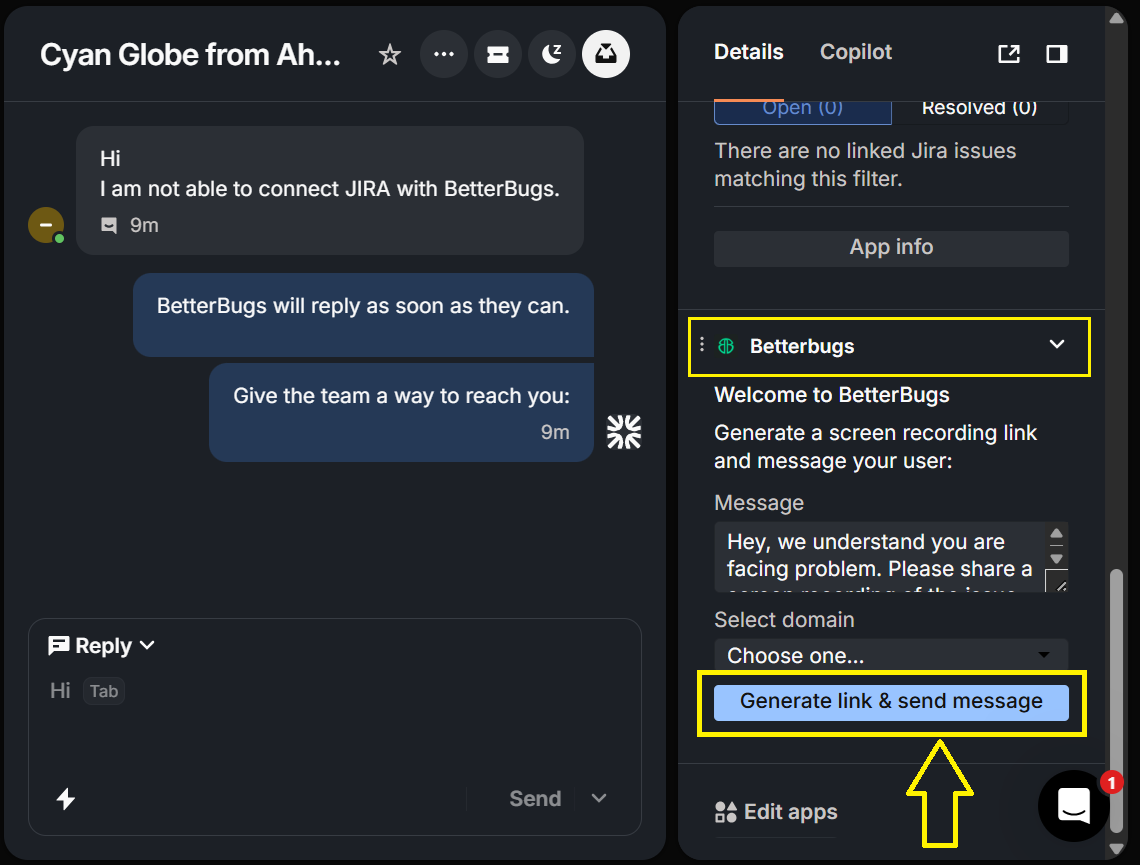
Generate and share the BetterBugs link in chat. The user will be guided to record their screen.
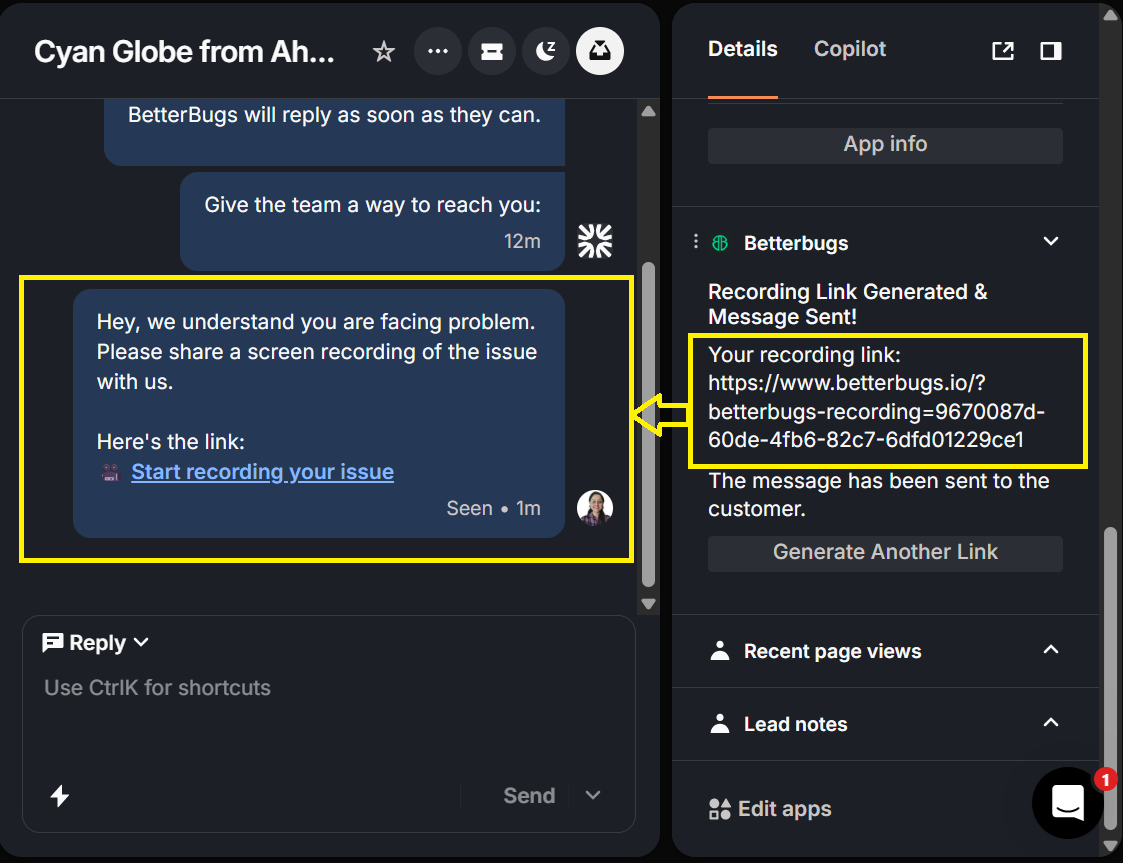
Once submitted, the screen recording appears in Intercom as a “BetterBugs Session” link.
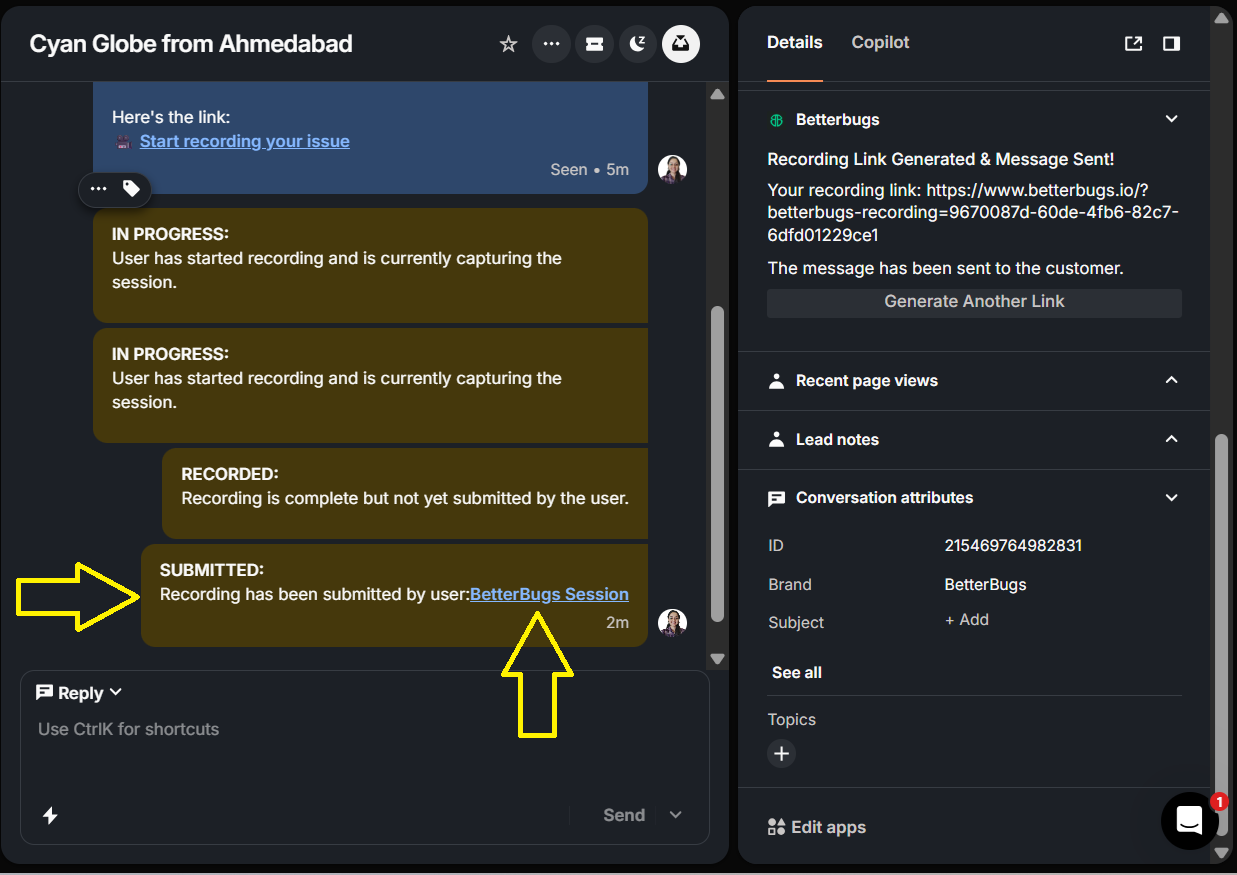
The submitted recording gets added to your BetterBugs project for (that includes visual proof + auto-attached technical details from user’s devtools) for further analysis and debugging purposes. BetterBugs and Intercom works perfectly in conjunction with recording links to streamline your customer support workflows.
While Marker.io offers basic and only paywalled solutions for visual bug reporting and website feedback, BetterBugs.io provides a well-rounded, all-in-one platform with features like MCP Server AI debugging, Sentry integration for event logs, and many others, all available at a significantly lower price point, including a generous free tier.
Simply put, BetterBugs.io provides comprehensive and significantly better + advanced bug reporting capabilities that makes it a no-brainer for individuals, small and mid-size SaaS teams, agencies, and enterprise companies.
Nishil is a successful serial entrepreneur. He has more than a decade of experience in the software industry. He advocates for a culture of excellence in every software product.
Meet the Author: Nishil Patel, CEO, and Co-founder of BetterBugs. With a passion for innovation and a mission to improve software quality.
We never spam.