
Black FridayUp to 31% off Team plansCode
Share your experience with the founderhere!

Nishil Patel
Feb 9, 2026
6 min read
Last Updated Apr 7, 2026
Check out the practical steps to integrate BetterBugs MCP with Windsurf. In this article, we’ve also covered how BetterBugs MCP helps you debug better with AI. Plus, it includes a step-by-step guide to use it with Windsurf.
1.
Introduction
2.
What is BetterBugs MCP and How It Helps in AI Debugging with Windsurf?
3.
How to Use BetterBugs MCP with Windsurf? Step-by-Step
4.
FAQs
In this article, we’ve covered the practical steps to integrate BetterBugs MCP with Windsurf. We’ve also included the steps to use MCP windsurf for AI debugging sessions. Learn more on how BetterBugs MCP enables you to share context rich and detailed bug reports (via a report link) to Windsurf so you can AI to fix issues in your app significantly faster and without hallucinations.
BetterBugs MCP enables you to add BetterBugs bug report link to Windsurf AI agent chat which then enables you to debug app issues or bugs with complete context , technical details, and visual proof. You can connect BetterBugs MCP with tools that function as MCP clients (such as Windsurf, VS Code, Cursor, Claude, and others).
Also Read: How to Use BetterBugs MCP + VS Code for AI Debugging: Step-by-Step Guide
The BetterBugs Model Context Protocol (MCP) acts as a standardized connector between your bug reports and the Windsurf AI.
When you share a BetterBugs link in the Cascade chat, the MCP doesn't just "read" the URL, it provides the AI agent with direct access to the underlying data layer of that report. BetterBugs MCP exposes 7 tools or functions with the Windsurf AI agent that enables it to get the complete context and details ( via BetterBugs report link) for accurate AI debugging sessions.
Through the 7 specialized tools (like getBugLogs and getScreenshot) that BetterBugs exposes, Windsurf can programmatically get the exact state of your app when the issue occurred (as captured in the bug report). These tools include:
So, instead of the AI guessing or hallucinating based on a vague description, it "sees" the console errors, inspects the network payloads, and reviews the system env metadata to pinpoint the exact line of code responsible for the failure. Based on the AI-led RCA, you can get the possible solutions that you can validate and implement immediately to your code.
Also Read: How to Use BetterBugs MCP with Cursor for AI Debugging: Steps-by-Step Guide
Here’re some example scenarios where BetterBugs MCP can help:
Also Read: Easy Steps to Use BetterBugs MCP with Claude for AI Debugging: Complete Guide
Quick overview of the steps:
STEP 1: Download and install the BetterBugs Chrome Extension.
STEP 2: Create a technical bug report using the extension.
STEP 3: Integrate BetterBugs MCP with Windsurf in minutes.
STEP 4: Add your prompt + BetterBugs report link to fix your code with complete details and context.
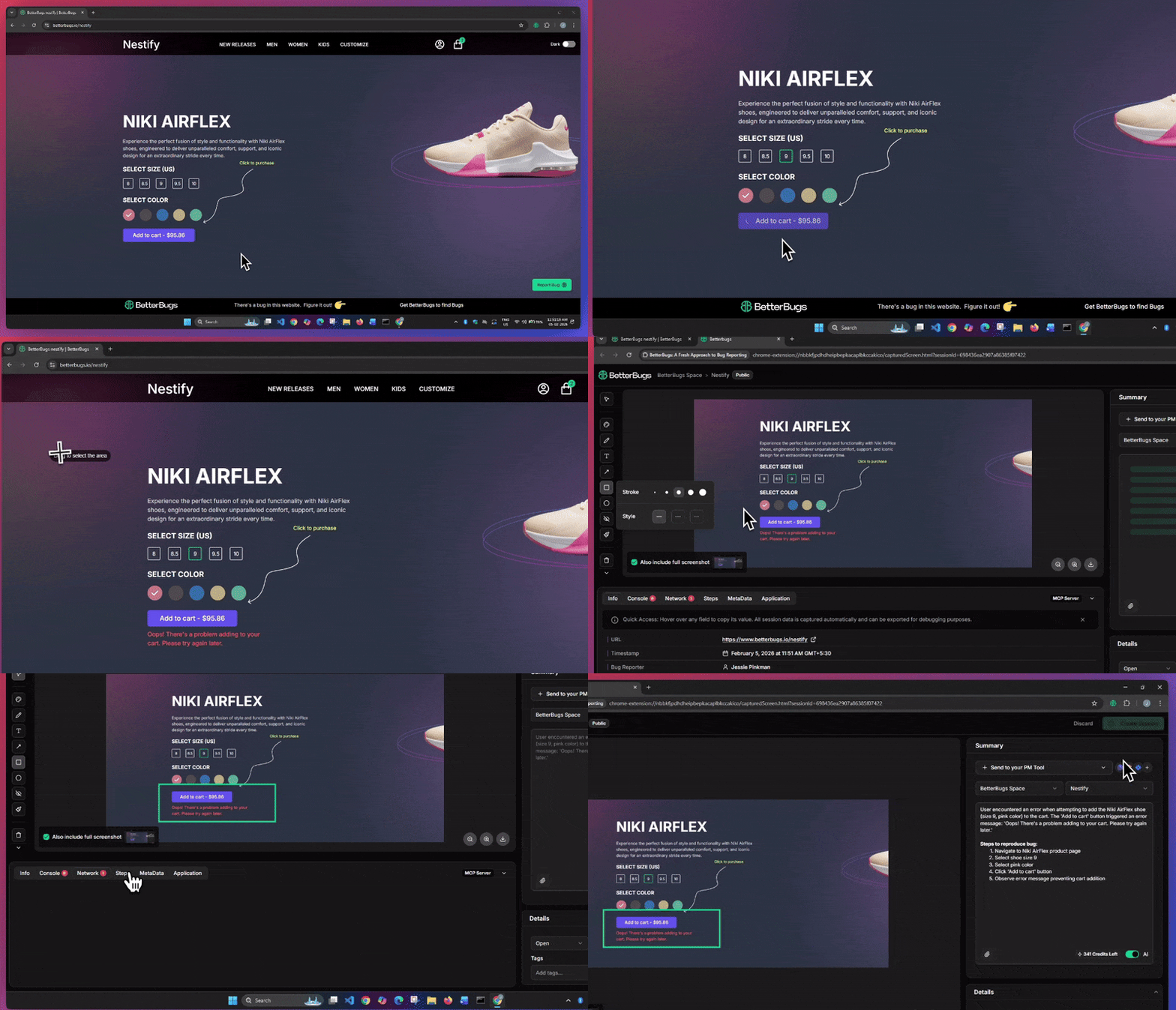
Steps to Create BetterBugs Report
Okay! This creates a BetterBugs bug report instantly. Make sure you keep the report link handy. You’d need the link while debugging with Windsurf.
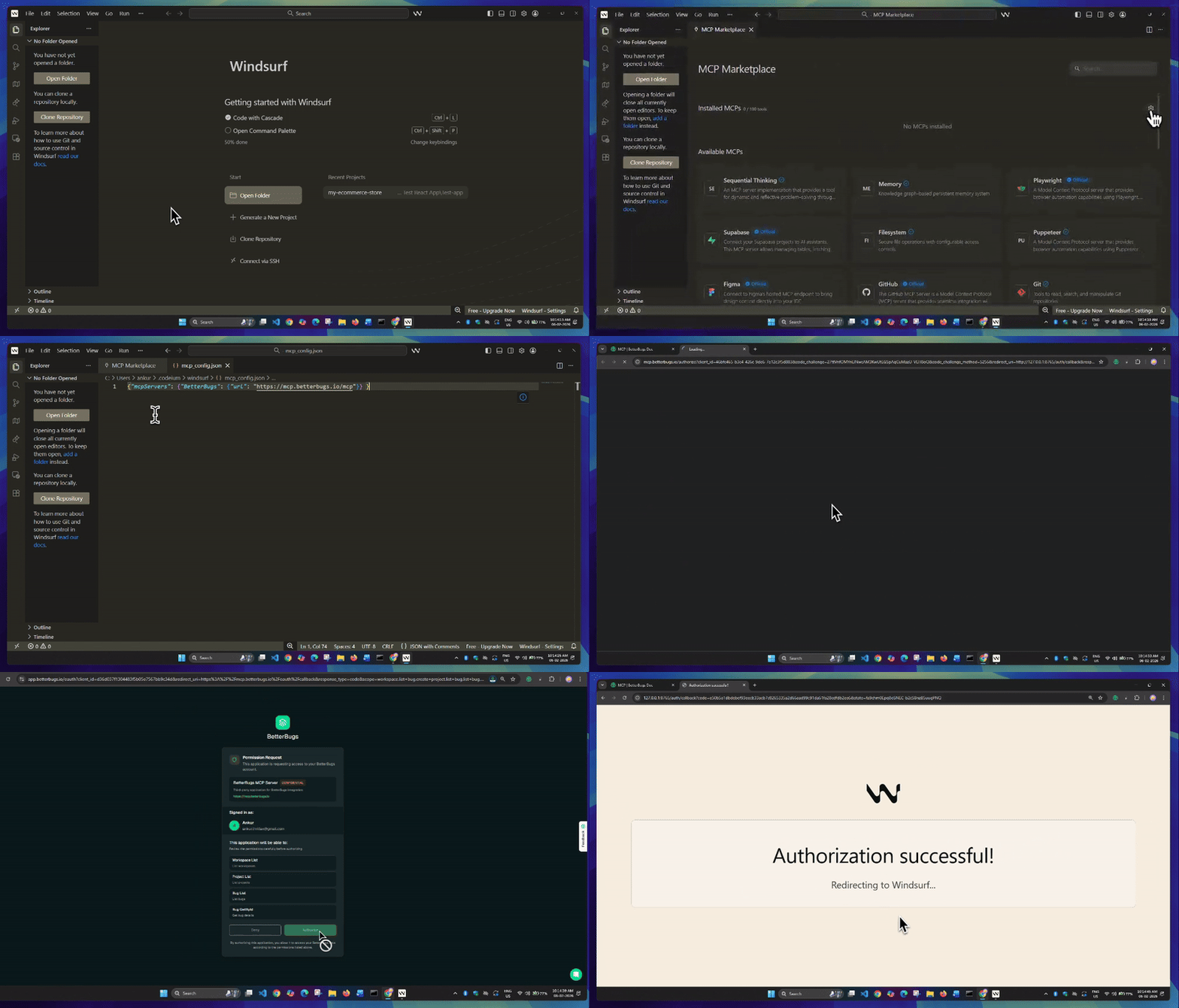
BetterBugs MCP + Windsurf Integration Steps
1. Open Windsurf and press CTRL/CMD + P
2. Enter >Windsurf: MCP Marketplace
3. In the MCP Marketplace window, click the gear icon on the right. This opens the “mcp_config.json” file right away.
4. In the JSON file, add the following code snippet:
{"mcpServers": {"BetterBugs": {"url": "https://mcp.betterbugs.io/mcp"}} }5. Save the file. This opens a Windsurf dialog box for authenticating it with BetterBugs. Click “Open”.
6. Finally, click “Authorize” and you’re good to go!
The authorization screen opens with the message that it’s successful! Make sure to exit and then reload Windsurf to ensure that changes are implemented correctly.
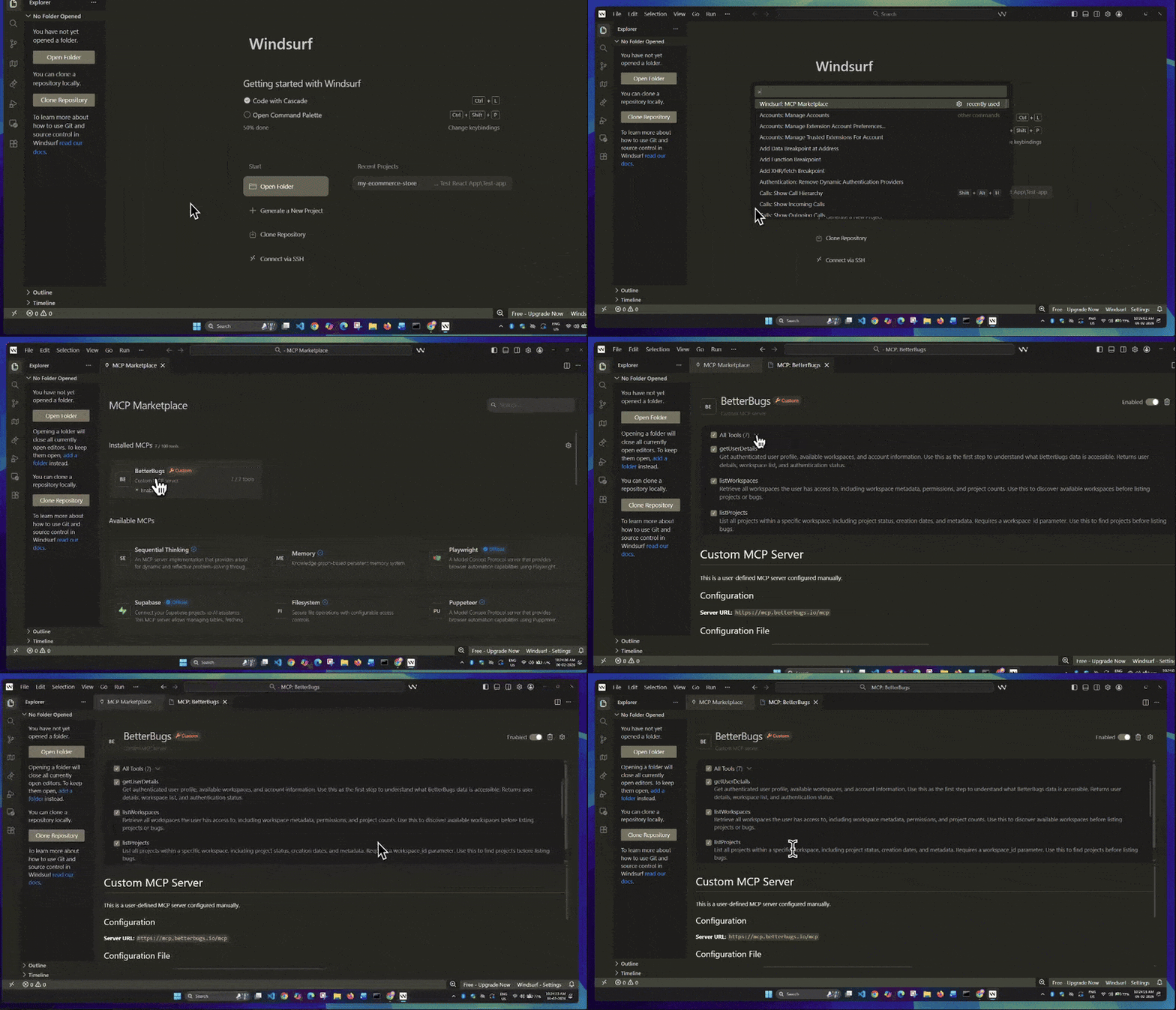
Confirm BetterBugs MCP + Windsurf Successful Integration
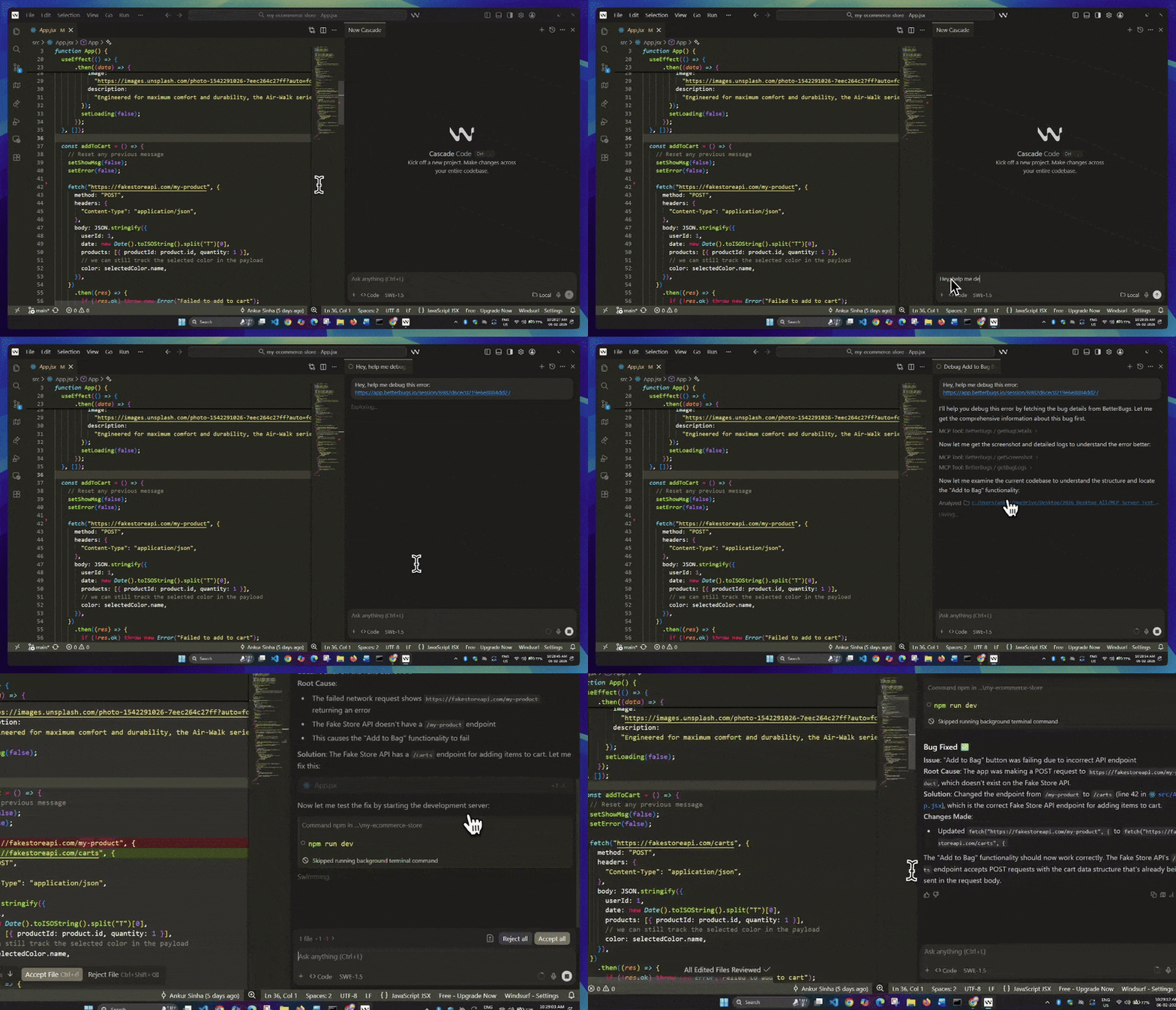
Using BetterBugs MCP + Windsurf Agent Mode to fix issue
PREREQUISITE: Make sure you have the BetterBugs report link handy.
1 - Open your app in Windsurf.
2 - Open Cascade Code/Agent Mode Chat interface from the top right.
3 - Enter your prompt along with the BetterBugs report link and hit Return. Here’s the prompt that you can use:
“Hey, help me debug this error: https://app.betterbugs.io/session/6982d6cec0219e6e8884dd27”
4 - This enables Cascade to pull bug details using BetterBugs tools (facilitated through MCP connection + report link). Cascade then runs the required tools from BetterBugs to get the complete context, analyzes issue screenshots, and logs to help debug and fix the issue.
5 - You can then validate the key findings, root cause, and possible fixes of the issue to implement in your code.
Nishil is a successful serial entrepreneur. He has more than a decade of experience in the software industry. He advocates for a culture of excellence in every software product.
Meet the Author: Nishil Patel, CEO, and Co-founder of BetterBugs. With a passion for innovation and a mission to improve software quality.
We never spam.