
Share your experience with the founderhere!

Nishil Patel
Jan 30, 2026
7 min read
Last Updated Apr 7, 2026

In this article, we’ve covered practical and easy-to-follow steps to integrate BetterBugs MCP with Claude. Learn more on how BetterBugs MCP, when paired with Claude, can help several folds in your AI debugging sessions.
1.
Key Takeaways
2.
How BetterBugs MCP + Claude can Help in Better AI Debugging Sessions?
3.
How to Use BetterBugs MCP with Claude App? Step-by-Step
4.
FAQs
Also Read: How to Use BetterBugs MCP with Cursor for AI Debugging: Step-by-Step Guide
Integrating BetterBugs MCP with Claude Desktop enables you to optimize debugging sessions in a typical bug life cycle. Here’s how BetterBugs MCP (when integrated with Claude) can help:
Traditional debugging requires you to manually copy and paste console logs, network payloads, and environment details into Claude. BetterBugs MCP automates this completely. All you need is to create a bug report using BetterBugs, share it with Claude along with your prompt. Claude then fetches the entire technical stack of a bug report via a single URL.
Through MCP tools (exposed by BetterBugs through MCP) like getBugLogs and getBugDetails, Claude receives un-truncated, structured data including:
With the "ground truth" data shared upfront with Claude, the integration reduces the need for back-and-forth clarification. Claude can immediately execute multi-step reasoning to identify mismatched data formats, authentication token issues, or silent integration failures.
Unlike ad-hoc prompt engineering, MCP enforces a strict schema. This ensures Claude’s analysis is grounded in the specific technical parameters of the reported session. And this significantly reduces model hallucinations caused by incomplete or outdated context.
Also Read: Bug Tracking Metrics: What to Measure and Why?
To use BetterBugs MCP with Claude, essentially there are four steps. These include:
Let’s get to it.
Okay! That completes the setup.
Here’s how to create a bug report using BetterBugs.io:
Okay! You’ve just created the bug report, ready to be used by Claude. Copy the report link and keep it handy.
NOTE: We’d paste the BetterBugs report link to Claude with a prompt for AI Debugging.
Also Read: Bug Reporting vs Bug Tracking vs Issue Tracking: What’s the Difference
Steps to integrate BetterBugs MCP with Claude:
{
  "mcpServers": {
    "betterbugs": {
      "command": "npx",
      "args": [
        "mcp-remote",
        "https://mcp.betterbugs.io/mcp",
        "--transport",
        "http-first"
      ]
    }
  }
}
To apply changes to the claude_desktop_config.json, quit the Claude Desktop app ( via the System Tray/Menu Bar) and then re-launch it.
To confirm for successful installation. Go to Settings > Developer > Local MCP servers. You should see “betterbugs” running in the Local MCP servers window.

BetterBugs MCP running in the Local MCP servers
To double check its available to use, take following steps:

BetterBugs Enabled in the Connectors option
You’re good to go with the integration. Let’s get to using it now.
PREREQUISITE: Make sure you have the BetterBugs report link handy.
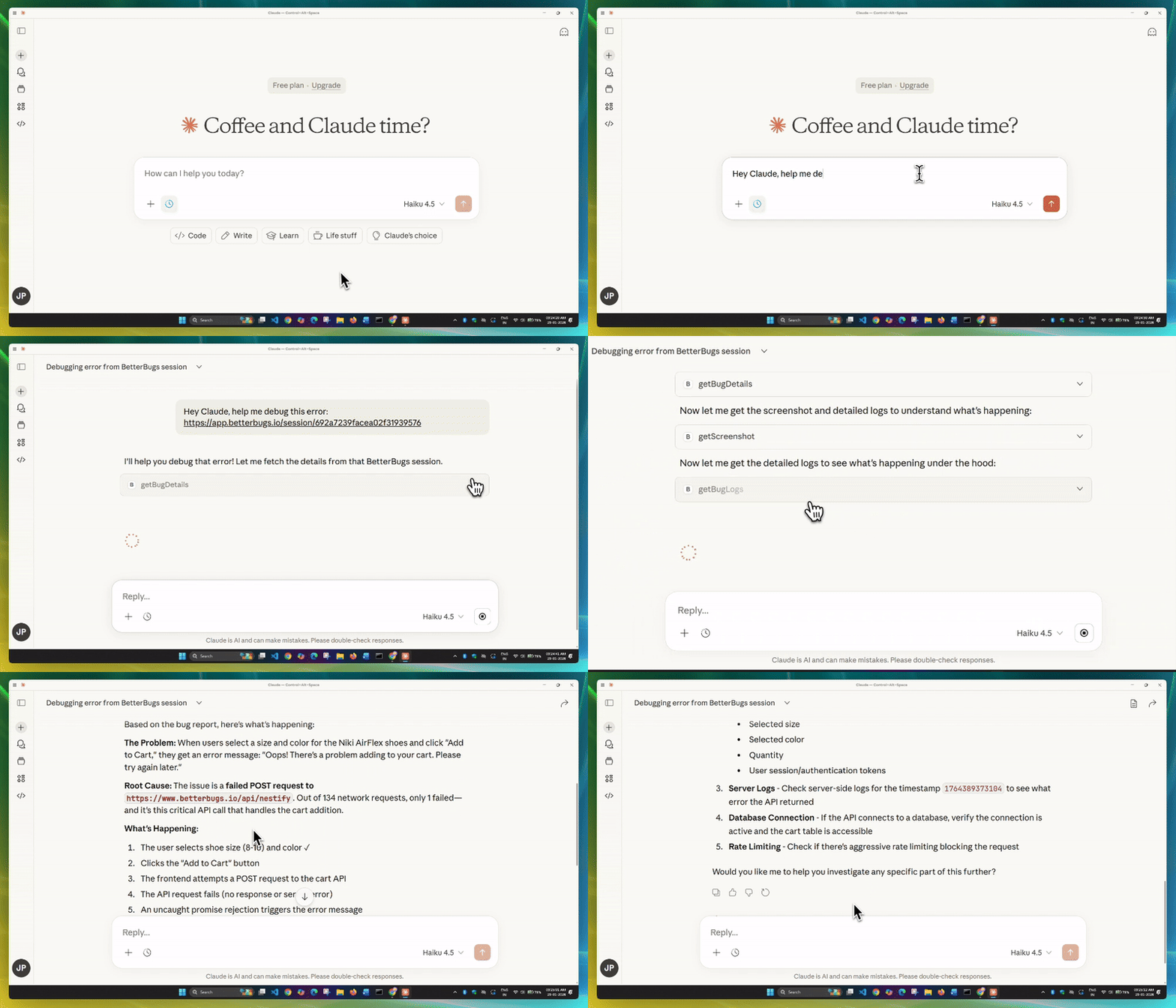
BetterBugs MCP + Claude App for AI Debugging
1 - Open Claude app and a new chat.
2 - Ensure you’ve “betterbugs” enabled in the “Connectors” option ( Goto “+” > Connectors)
3 - Enter your prompt along with the BetterBugs report link and hit Return. Here’s the prompt that you can use:
“Hey Claude, help me debug this error: https://app.betterbugs.io/session/692a7239facea02f31939576”
4 - Claude then runs the required tools from BetterBugs. There are a total of 7 tools that BetterBugs exposes to Claude, including:
So, Claude will do a tool calling (facilitated by BetterBugs MCP via report link) for all the details and context it requires to do a root cause analysis, providing possible fixes of the issue. And this enables you to combine AI + your manual expertise to debug way faster and better, speeding up the debugging process several folds.
Nishil is a successful serial entrepreneur. He has more than a decade of experience in the software industry. He advocates for a culture of excellence in every software product.
Meet the Author: Nishil Patel, CEO, and Co-founder of BetterBugs. With a passion for innovation and a mission to improve software quality.
We never spam.