
Share your experience with the founderhere!

Nishil Patel
Aug 17, 2026
5 min read
Last Updated Aug 17, 2026

Check out the easy steps to create and share precise and technically sound bug reports on Bugasura in 2026 using the BetterBugs tool; perfect for your everyday QA, software testing, project management, development, and support team workflows.
1.
What is Bugasura and how it’s typically used by QA and developers
2.
How BetterBugs.io can help — Free Bug Reporting Chrome Extension for Bugasura
3.
Easiest way for creating debugging-ready bug reports on Bugasura in 2026
4.
FAQs
Bugasura is a collaborative bug tracking and issue management platform, used by software teams for quality assurance (QA) and development lifecycle. It’s widely preferred by agile teams as a central hub for logging, tracking, managing, and resolving defects, feature requests, and other project tasks.
QA teams rely on Bugasura to streamline the bug reporting process and test execution. Here’s how:
Developers use Bugasura to streamline bug tracking, debugging and fixing issues across the development workflow. Here’s more on it:
Also Read: Easiest Way to Report Bugs on Jira: Step-by-Step Guide
Even with a battle-tested bug tracker like Bugasura, the manual way of creating the bug report often remains a slow, fragmented, and tedious:
This tedious manual workflow prevents QA from focusing on high-value testing and delays developers from fixing bugs immediately. This is precisely where BetterBugs steps in, automating the bug reporting process.
Also Read: What’s the Average Cost of a Software Bug?
BetterBugs enables you to create actionable and developer-friendly visual bug reports in a few clicks. You can share the bug report to Bugasura Project instantly right from your browser.
It's suitable for both technical and non-technical members in software as an everyday and lightweight bug reporting tool; perfect for bug tracking, quality assurance (QA), and software testing activities.
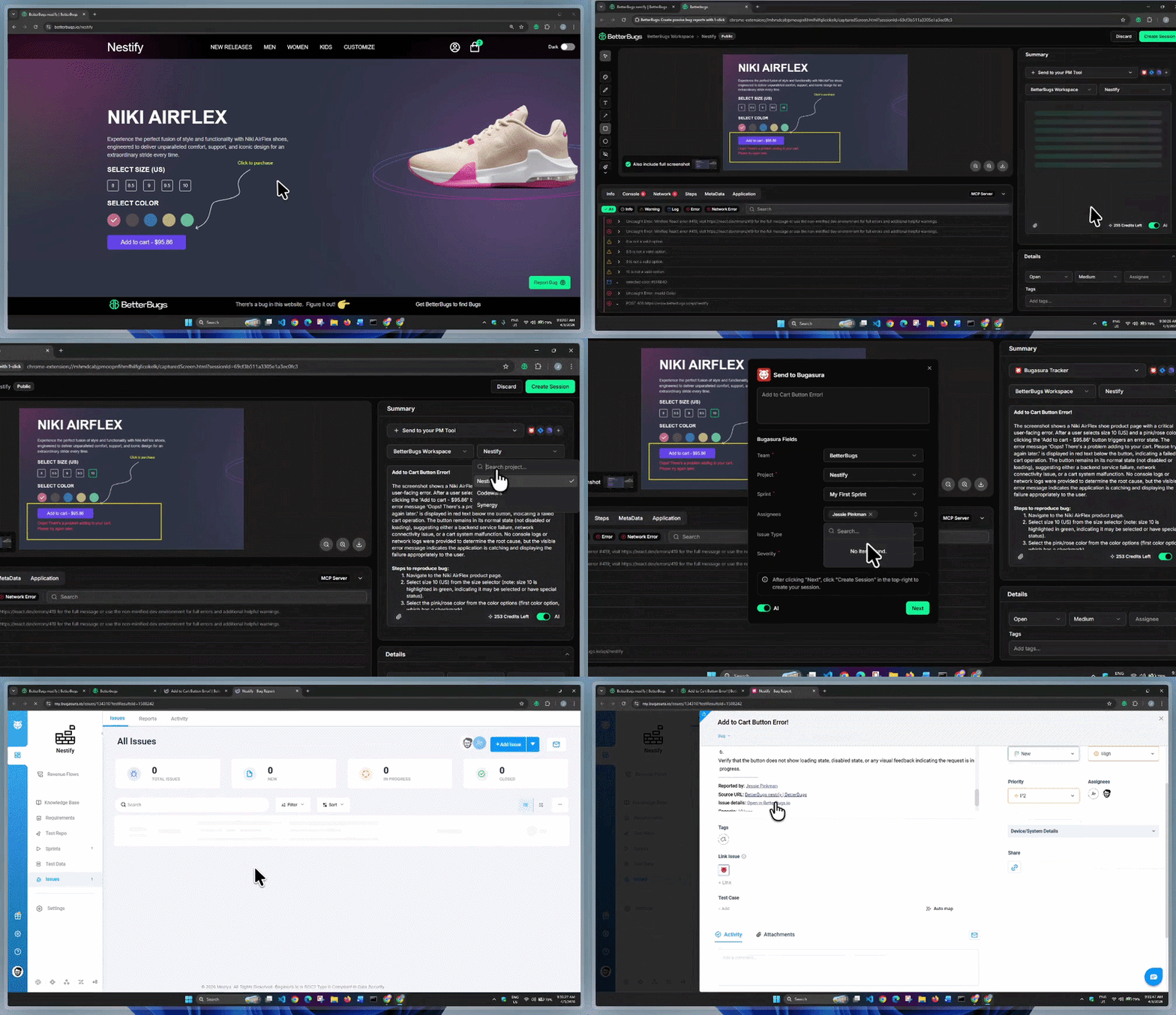
Bugasura Task Created using BetterBugs within Minutes
Once you take a screenshot or record the screen using the BetterBugs FREE Chrome extension, you can instantly add the details (summary and steps to reproduce) for the issue using AI.
You also have the “Rewind” option that gives you the last 2 minutes recording of all your browser activities — automatically. You do not have to proactively start recording; perfect for getting visual proof if a bug happens at that exact moment.
BetterBugs auto-attaches the technical details (console logs, network requests, system and env information, backend event logs from Sentry integration, application state info, and many others) to the bug report.
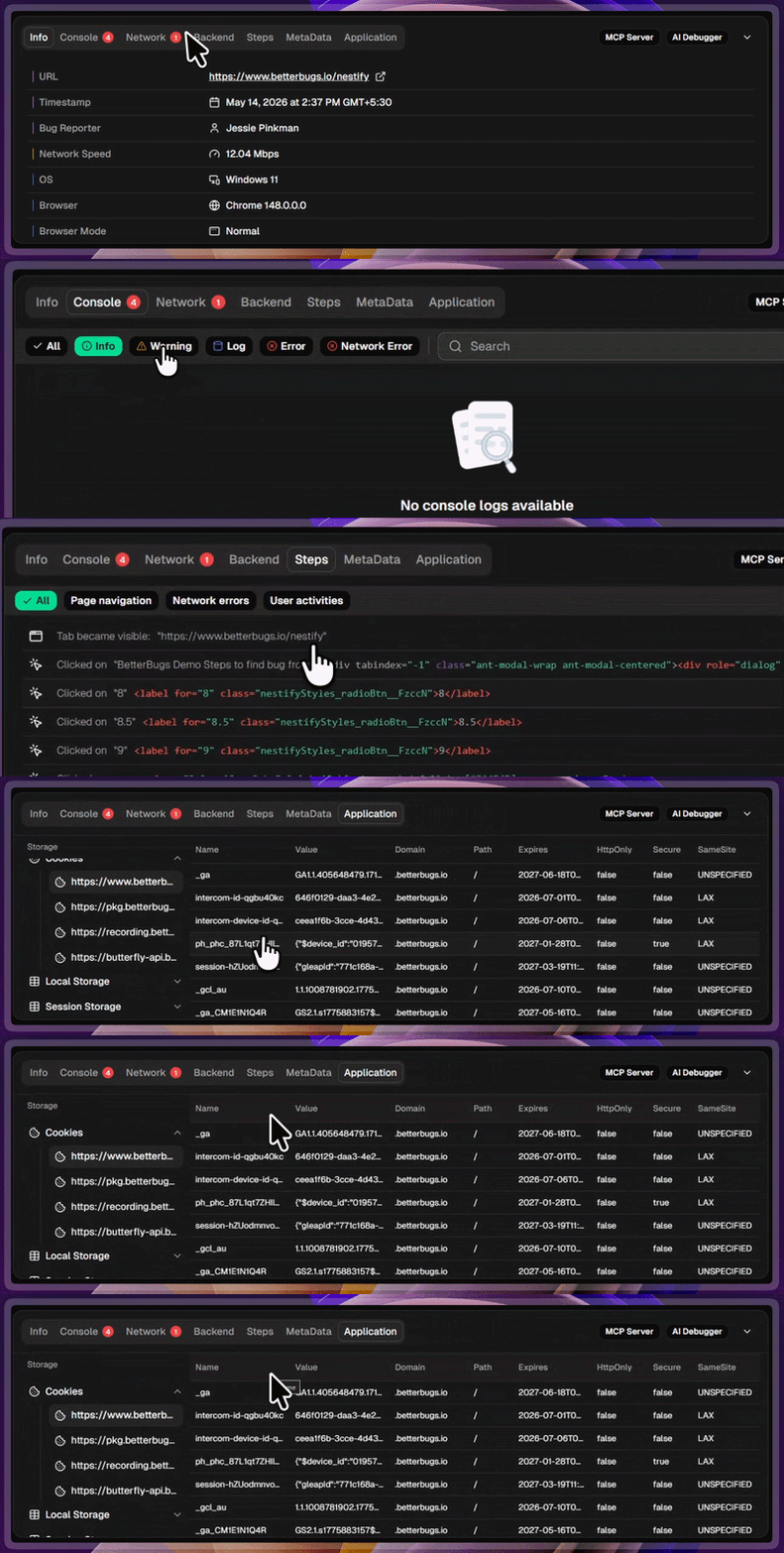
Auto-attached Technical Info for Bugs with Every Bug Report
You can conveniently send the bug reports (packed with visual proof, details, and other info) directly to your Bugasura Project — right from your browser. You do not need to add bug details manually or juggle tools while reporting bugs on Bugasura.
BetterBugs automates the evidence gathering and sharing process for you for your bug reporting workflows!
You can integrate BetterBugs with your preferred project management tools, issue trackers, and communication tools , such as Jira, GitHub, GitLab, Basecamp, Asana, Slack, and many others.
You can use the integrated AI-Debugger (for BetterBugs reports) to get the reproducibility, possible solutions, test cases, and other info within seconds; perfect for developers to debug the issue much faster.
Or, for more accurate AI debugging with zero-context loss that grabs complete technical details, you can use the BetterBugs MCP server with your favorite text editor or IDE (VS Code, Cursor, Claude Code, Google Antigravity, and any other). Once you set it up (takes less than 5 mins), all you need is the BetterBugs bug report link + quick prompt.
Before you start, make sure you’ve the Bugasura User API key handy. You’ll need to paste it into BetterBugs for integration.
To get the key:
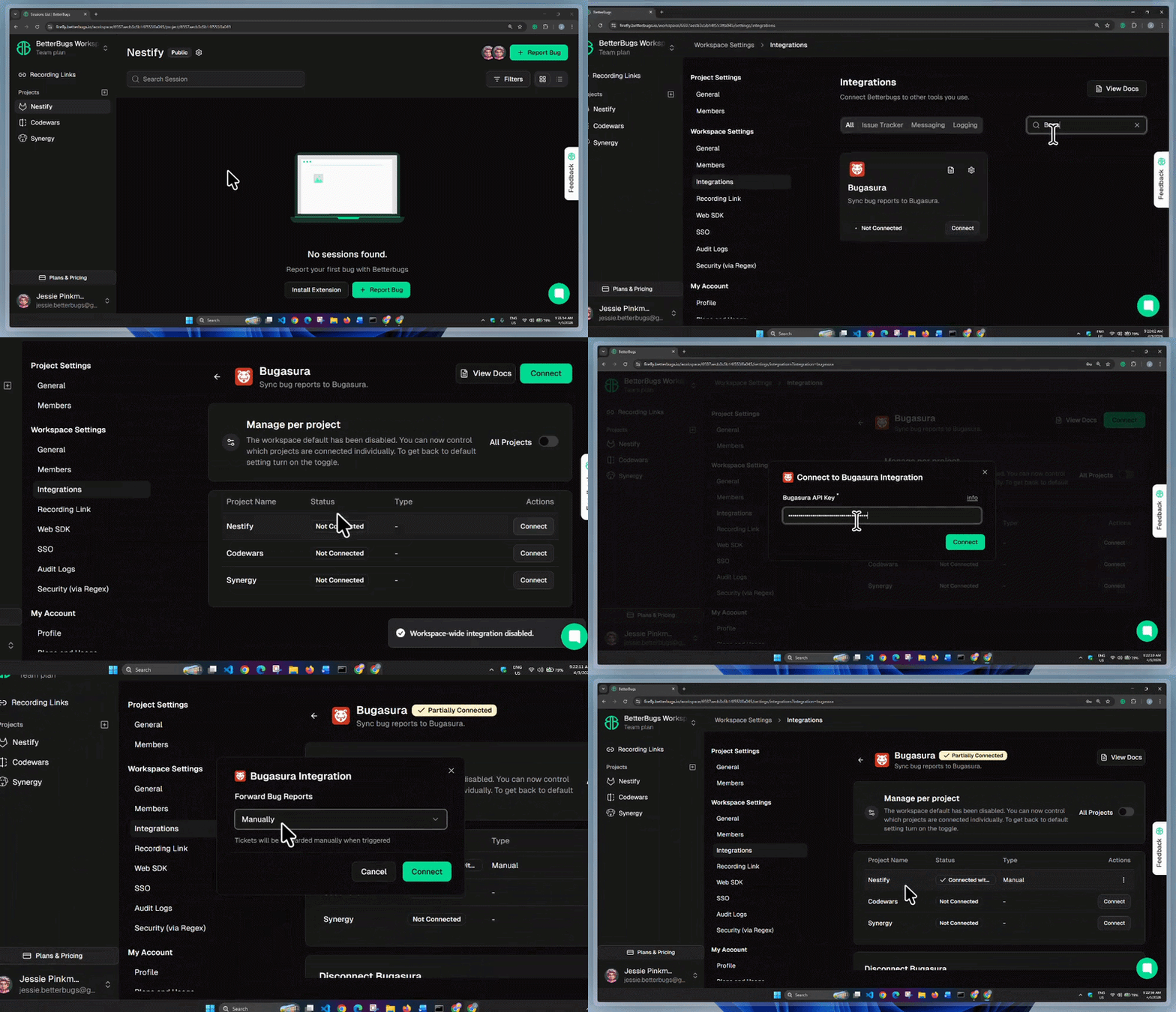
BetterBugs.io + Bugasura: Integration Demo
1 - Go to Workspace Settings > Integrations —> Click your BetterBugs workspace name (top left), select the gear icon for Workspace Settings, and go to Integrations.
2 - Select Bugasura —> Search for Bugasura and click on its card.
3 - Enable Project-Level Integration —> Toggle off All Projects and click Continue to get the "Manage per project" option.
4 - Connect a Project —> From the BetterBugs project list, search the project that you need to connect with Bugasura in the list and click “Connect” in the Actions column.
5 - Add API Key —> Enter your Bugasura User API key and click Connect.
Note: If you are on a free plan, the integration is now complete! You can skip the remaining steps.
6 - Choose Ticket Creation Method (Paid Plans Only): From the "Forward Bug Reports" dropdown, select how you want to create tickets in Bugasura:
7 - Finalize —> Once you select your preferred method, click Connect to complete the setup.
Okay! You’re good to go with the integration.
Create and Share Bug Report on Bugasura using BetterBugs.io | Demo
1 - Capture and Detail the Bug —> Use the BetterBugs extension to capture the bug. Add the Title, Summary, and Steps to Reproduce manually, or use the AI toggle to generate them automatically.
2 - Select Workspace and Project —> From the dropdowns above the description area, choose your BetterBugs Workspace and the BetterBugs Project integrated with Bugasura.
3 - Select PM Tool —> Click the “+ Send to your PM Tool” dropdown and choose Bugasura Tracker.
4 - Populate Ticket Details —> Fill in the required Bugasura fields (Team, Project, Sprint, Assignees, etc.) and click “Next”.
5 - Create Session —> Click Create Session in the top right corner.
A new tab opens showing your Bugasura task, complete with:
You can also access this Bugasura task directly from the BetterBugs report under the Comments & Activities tab.
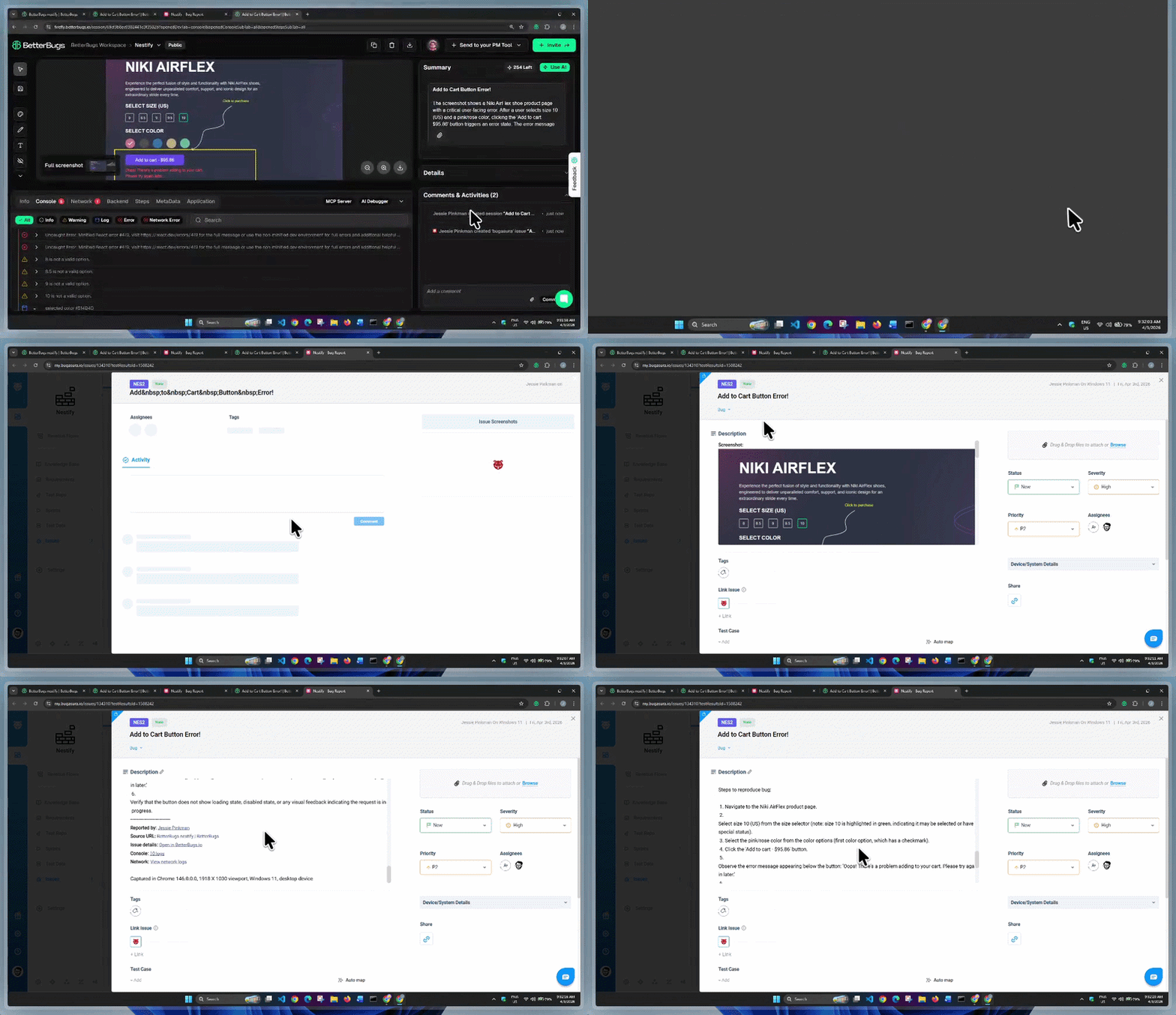
Instantly Access Bugasura Task from Comments & Activities Tab
Nishil is a successful serial entrepreneur. He has more than a decade of experience in the software industry. He advocates for a culture of excellence in every software product.
Meet the Author: Nishil Patel, CEO, and Co-founder of BetterBugs. With a passion for innovation and a mission to improve software quality.
We never spam.