
Share your experience with the founderhere!

Nishil Patel
Sep 3, 2026
5 min read
Last Updated Sep 3, 2026

In this article, we’ve covered the steps for creating actionable and technically sound bug reports on Trello using BetterBugs.io. Learn why and how BetterBugs can make this process significantly faster and more efficient than traditional, manual ways.
1.
Introduction
2.
What is Trello?
3.
How BetterBugs.io Can Help — Free Bug Reporting Chrome Extension for Trello
4.
How to Create Bug Reports on Trello: Easy Steps
5.
FAQs
For Quality Assurance (QA) and testing teams, the process of manual bug reporting is often cumbersome and immensely time-consuming. It typically involves a tedious multi-step process: spotting the bug, taking a screenshot or recording a video, meticulously documenting the steps to reproduce, manually gathering technical details like console logs and network requests, noting down system information (browser, OS, viewport size), and finally, compiling all this scattered info into a structured report in a tool like Trello.
This manual effort often consumes a significant chunk of a tester's day and frequently leads to incomplete or missing context. And this results in frustrating back-and-forth with devs. This is exactly where an automatic bug reporting tool, such as BetterBugs.io can be immensely helpful.
In this article, we’ve covered the steps to create dev-friendly bug reports using BetterBugs.io that helps reduce report creation time from hours to just a few minutes. And ensure that every bug report sent to Trello is instantly actionable.
Also Read: How to write effective bug reports: Step-by-Step Guide
Trello is a popular, easy-to-use visual collaboration and project tool that uses the Kanban system. It is structured around Boards, Lists, and Cards. It's immensely intuitive for managing projects of any scale, from personal task lists to large-scale software development works.
Teams often use Trello for:
To visualize project roadmap and current sprint progress. Lists often represent stages in the development pipeline (e.g., “Backlog”, “To Do”, “In Progress”, “Code Review”, “Done”). Development tasks, user stories, and feature requests are represented as Cards that are moved across the lists as they progress.
Also Read: What's the average cost of a software bug?
Trello is used by many as a lightweight bug tracking system.
A dedicated list, often titled “Bug Reports” or “QA Review”, is created to centralize all reported issues. Testers and QA engineers create a Card for each bug.
Also Read: How to create bug reports in Jira?
BetterBugs.io enables you to whip up technically sound and context-rich bug reports in seconds that you can instantly share on Trello. You do not have to gather evidence or juggle tools manually when you need to add bug reports to Trello. BetterBugs does it for you — automatically.
BetterBugs.io is a visual bug reporting and bug tracking tool for Chrome. You can download it for free from the Chrome web store.
You can integrate it with Trello and 15+ other project management tools and issue trackers. It’s a no-code tool and perfect for technical and non-technical users.
Also Read: How to create bug reports in Asana? Step-by-Step Guide
Whenever you capture a bug using BetterBugs.io (as a screenshot, screen recording, or Rewind session), BetterBugs.io auto-captures and attaches the meta and technical details of the bug from your devtool logs.
You can add details for the bug using “AI” that instantly generates:
Once you’re done, you can send the complete report to your Trello project in one-click. No copy pasting required.
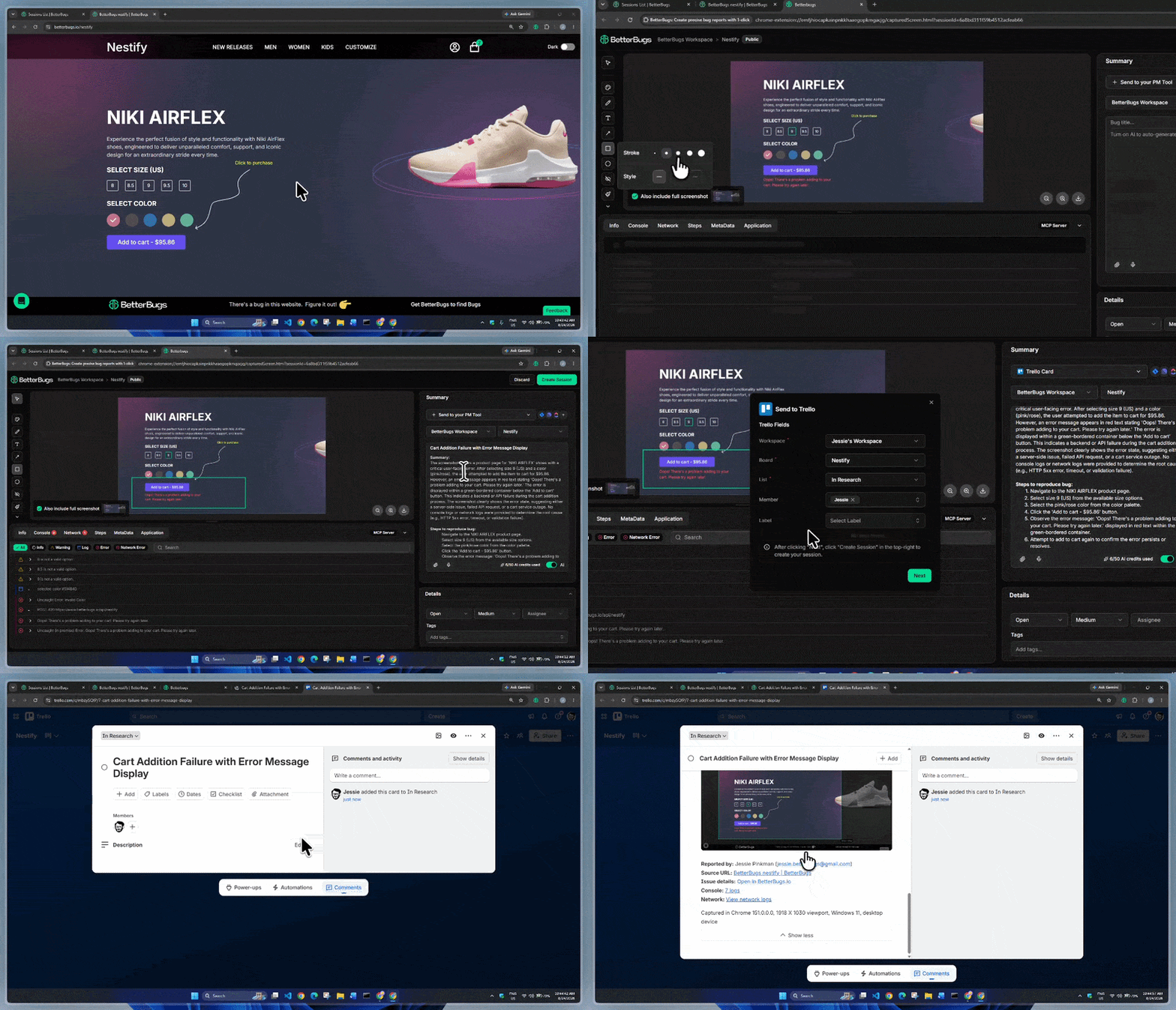
Creating a Bug Report and Sharing Instantly on Trello | Video Demo
Using the report, developers can start debugging right off the bat with all the details, complete context, and zero-missing info.
Every report comes bundled with:
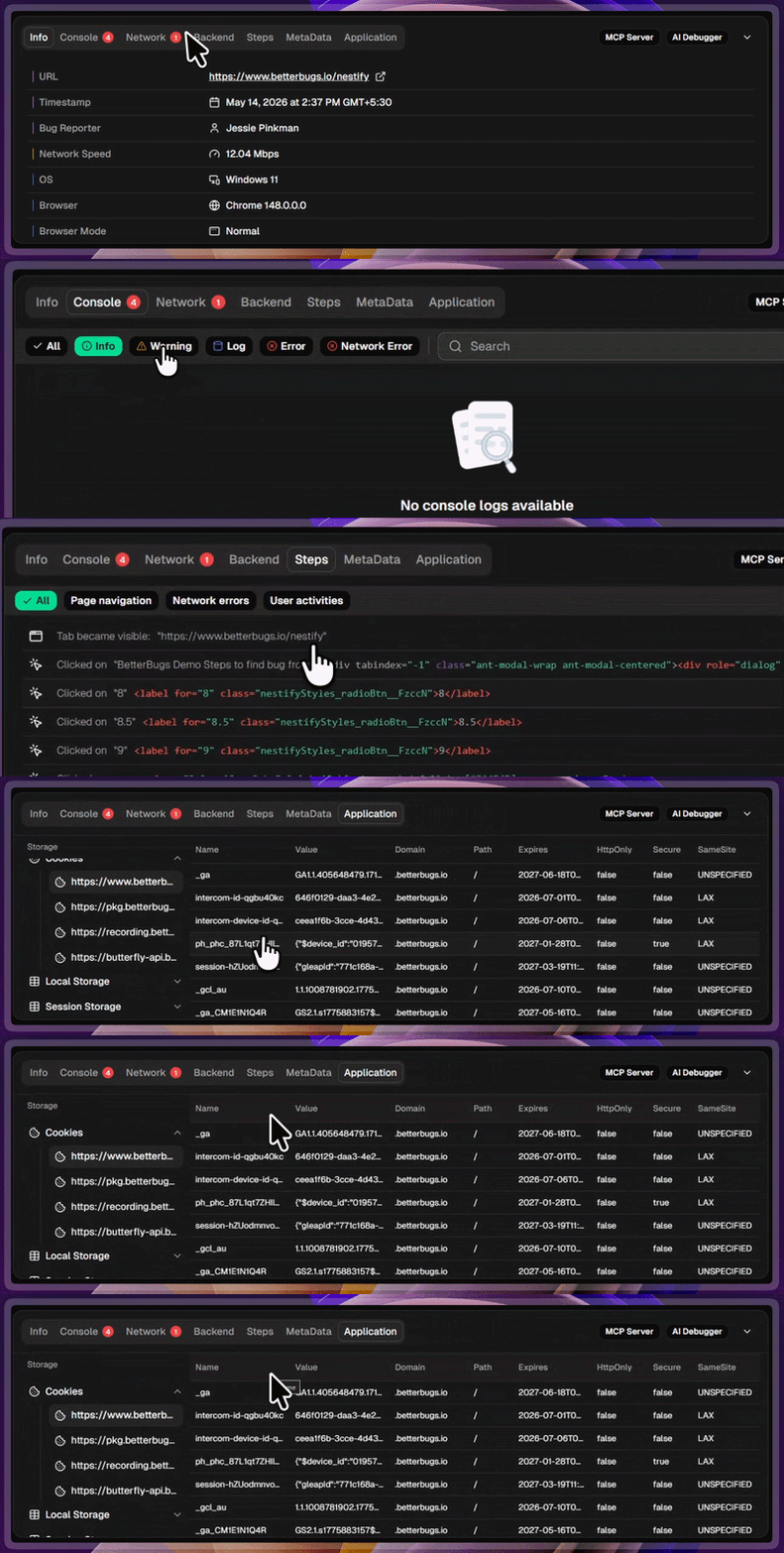
Auto-attached Technical Details with Every Bug Report
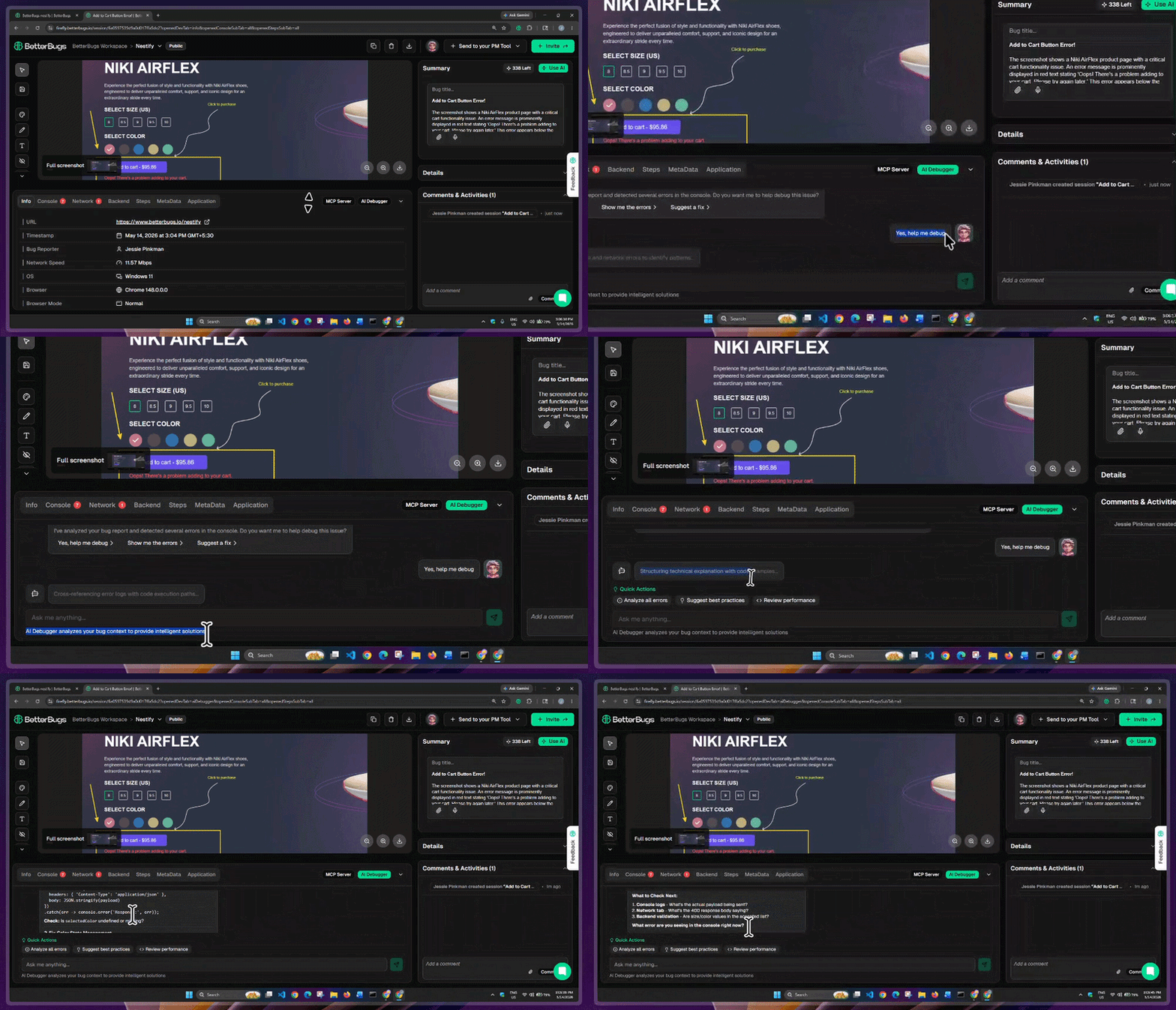
BetterBugs AI Debugger
BetterBugs comes with an built-in AI Debugger that gives you an instant RCA, possible solutions, test cases, and other info to resolve the issue with minimum cognitive load. That too in a chat-style format.
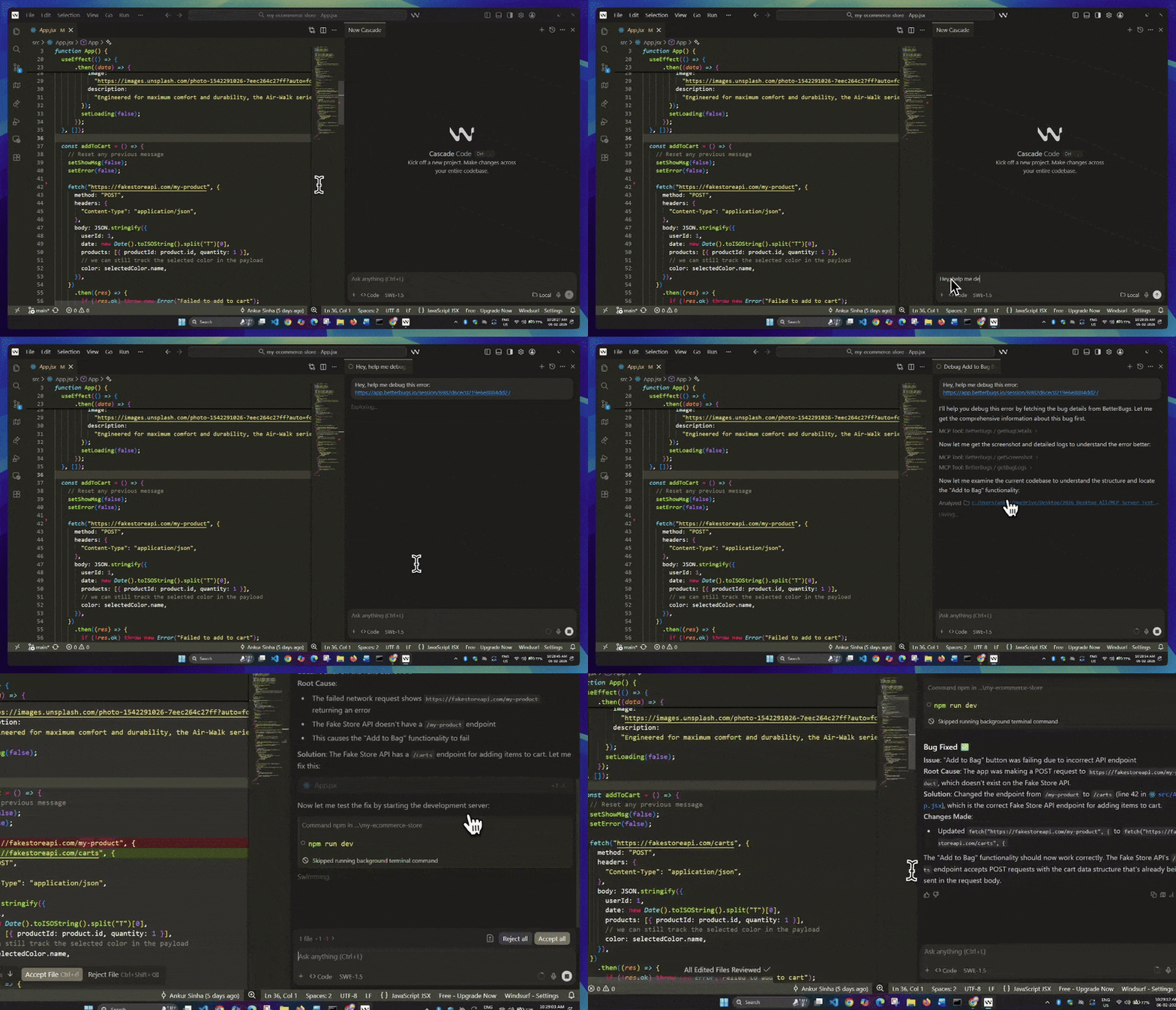
Fixing Bug on Windsurf using BetteBugs Bug Report Link + Quick Prompt
For more accurate AI fixes, you can use the BetterBugs MCP server (works with VS Code, Cursor, Windsurf, Claude Code, and others). Once you set up the MCP server (takes less than 5 minutes), all you need is the BetterBugs bug report link + quick prompt to get more accurate AI fixes.
Your AI agent can grab all the context and technical details of the bugs using the bug report link. You do not need to add them manually to your AI tool. BetterBugs automates this for you via its MCP server connection.
Now, you can manage all your bug reports centrally from your BetterBugs account/dashboard.
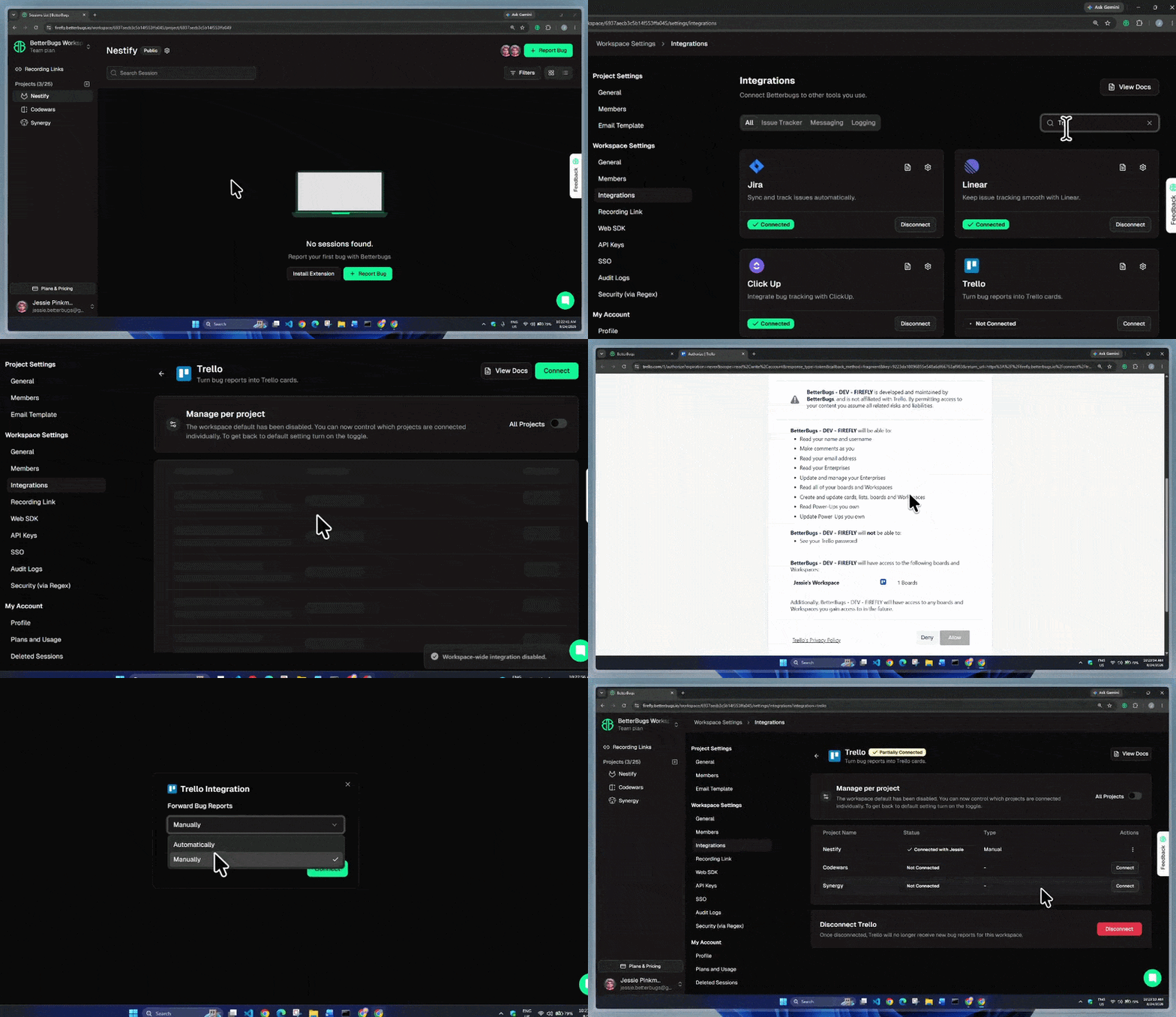
BetterBugs and Trello Integration
You’re all set with the integration!
Here’s how to create and share technical sound and context rich bug reports on Trello:
Creating a Bug Report and Sharing Instantly on Trello | Video Demo
A new tab opens with your Trello card with the bug details, technical info, and a direct link to the full BetterBugs report. You can also access this card later from the "Comments & Activities" section in your BetterBugs bug report.
Nishil is a successful serial entrepreneur. He has more than a decade of experience in the software industry. He advocates for a culture of excellence in every software product.
Meet the Author: Nishil Patel, CEO, and Co-founder of BetterBugs. With a passion for innovation and a mission to improve software quality.
We never spam.