Bug Reporting Best Practices for Dev Teams [2027] | BetterBugs
Nishil Patel
Oct 16, 2026
5 min read
Last Updated Oct 16, 2026
Last Updated Oct 16, 2026
Share
In this article, we’ve covered the bug reporting best practices that you can use in 2027 for during and after developing your products. It also includes key components of a debugging-ready bug report, common mistakes that slow down your triage meetings, how a bug reporting tool, such as BetterBugs.io can help to automate evidence gathering, and a bug reporting checklist that you can borrow.
Table of Contents
1.
Key Takeaways
2.
What Makes a Bug Report "Debugging-Ready"?
3.
Debugging-Ready Bug Reports: 5 Key Components
4.
Bug Reporting Best Practices for Dev Team [2027]: Technical Context Breakdown
5.
How AI Has Changed the Way People Report Bugs
6.
How AI Bug Reporting Affects Industry Processes
7.
How BetterBugs.io Can Help?
8.
5 Common Bug Reporting Mistakes that Slow Down Your Bug Triage Meetings
9.
Bug Reporting Checklist: For Development Teams [2027]
10.
FAQs
Key Takeaways
Debugging-Ready Bug Reports for Better and Faster RCA: High-quality reports packs in complete app runtime telemetry (logs, network payloads, stack traces, sys info, and app state) for significantly faster RCA sessions. Using a bug reporting tool such as BetterBugs.io works best for this. With every screenshot/screen recording you take, it auto-attaches complete bug telemetry. No manual evidence gathering required. BetterBugs.io does this for you, automatically.
Zero Technical Guesswork: Precise client-side and server-side state removes the need for devs to recreate complex env. manually just to observe failure states.
Standard Bug Triage Protocols: Avoiding vague titles, multi-issue bundling, and uncontextualized assets prevents back-and-forth during bug triage meetings; helps maintain high velocity in sprint execution.
Auto-attached Telemetry for Errors: Human error during manual bug logging is the single largest contributor to incomplete tickets. Shifting from manual evidence gathering to automated log capturing can ensure consistent coverage across every sub-system.
Automated Ticketing on Bug Trackers and Issue Trackers: Tools such as BetterBugs.io integrate with your existing project tools, such as Jira, GitHub, and many others. This enables you to create debugging-ready tickets in one click to these bug tracking tools, right from your browser.
Along with the visual cues, debugging-ready bug reports should have enough technical telemetry and operational state. These enable developers to diagnose, reproduce, and resolve a defect without requesting additional followups from the reporter. And this requires going way past just adding vague issue descriptions ("the login page throws error").
Uncaught TypeError: Cannot read properties of undefined (reading 'id')
    at PaymentForm.jsx:142:28
    at dispatch (react-dom.production.min.js:244:280)
    at Object.onCommit [as discharge] (checkout-store.ts:88:12)
Network Requests and Payload Telemetry
A complete request log must include:
Request URL & HTTP Verb: e.g., PUT /api/v1/user/settings
HTTP Status Code: Client-side input errors (400 Bad Request, 422 Unprocessable Entity) from system failures (500 Internal Server Error, 504 Gateway Timeout).
Request Headers and Payload: Auth tokens, Content-Type, and raw JSON request bodies.
Response Payload: The raw response string or JSON returned by the endpoint.
Timing Metrics: DNS lookup time, TTFB (Time to First Byte), and total duration to identify latent API responses or timeouts.
Operating System & Architecture: OS variant and architecture (e.g., macOS Sonoma 14.5 arm64, Windows 11 x64).
Display State: Screen resolution, viewport dimensions, device pixel ratio (DPR), and touch-input capability flags.
Application Meta: Deployment build number, environment stage (staging, pre-prod, canary), any other meta info required
How AI Has Changed the Way People Report Bugs
With traditional methods and tools, logging a complete bug report required QA engineers and end-users to manually copy console logs, format step-by-step reproduction chains, and summarize complex runtime failures. In 2026 and going forward to 2027, AI has fundamentally shifted bug reporting from a manual writing exercise to an automated process.
Here’s how:
Session-to-Step Translation —>LLMs can now analyze captured screen recordings, DOM interactions, and user event streams to auto-generate precise steps to reproduce. This helps avoid human errors and missing sequence gaps.
Contextual Title and Summary Generation —> Instead of vague reporter-submitted titles (e.g., "Checkout button broken"), LLMs parse local error state data to draft clear, behavior-driven summaries.
Zero-Effort Non-Technical Reporting —>Non-technical internal team members and users can record a quick session or speak/type a clear description of the bug. AI removes this gap by translating plain language (through voice) into structured issue reproduction steps and summaries.
How AI Bug Reporting Affects Industry Processes
Easy QA-to-Developer Handoffs and No Clarification Cycles —> By auto-attaching complete runtime state, console logs, and step-by-step UI actions, AI-driven bug reports remove the endless "cannot reproduce" back-and-forth between QA and developers. And this drastically shortens ticket lifecycles.
Cross-Functional Alignment (Product, QA, and Engineering) —>Standardized reports ensure product managers, QA engineers, and developers share a single source of truth. This prevents misaligned assumptions regarding expected versus actual business logic in complex applications.
Direct Feed into AI Agents for Debugging (LLM-Native Context) —> Bug telemetry is no longer captured solely for human reading. Now, complete bug contexts can be exposed directly to AI agents and text editors like Cursor, Claude Code, or VS Code using Model Context Protocol (MCP) servers. This allows AI agents to query the exact bug state, analyze the stack trace, and draft code fixes way faster.
Faster Root Cause Analysis (RCA) —> Integrated chat-style AI debuggers can quickly client-side runtime state alongside backend APM logs (e.g., Sentry) to propose potential root causes and targeted test cases in real-time. This significantly reduces developer RCA time from hours to minutes.
How BetterBugs.io Can Help?
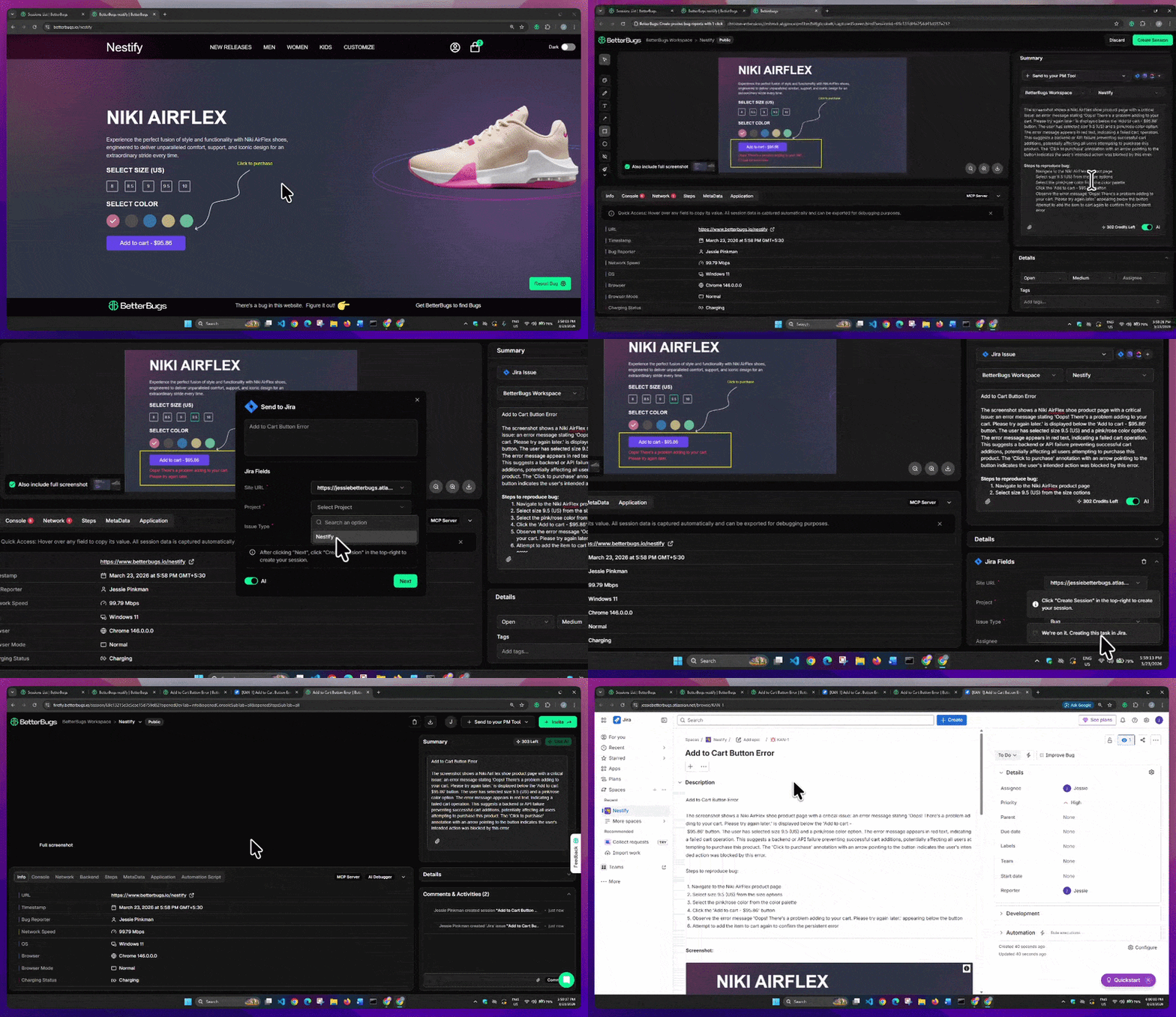
Manually gathering console logs, network payloads, and environment details is not cool in 2027. BetterBugs.io solves this bottleneck by automating technical evidence gathering right from your browser.
Create Debugging-ready Bug Report with One-Click and Share Instantly as Jira Ticket | Video Demo
AI-Assisted Reports —> Use the AI switch in BetterBugs reports to instantly generate clear bug titles, summaries and structured steps to reproduce based on recorded user sessions.
AI-Assisted Reports —> Use the AI switch in BetterBugs reports to instantly generate clear bug titles, summaries and structured steps to reproduce based on recorded user sessions.
Add Bug Details using Voice —> Once you’ve captured a screenshot/screen recording, you can also describe the bug using your voice. The details get transcribed (and gets added into the description area) powered by AI.
Auto-redaction of sensitive info from the reports: BetterBugs.io auto-redacts sensitive data types like authentication headers, access tokens, emails, passwords, card numbers, CVV, and API keys from the reports. Plus, you can add custom regex patterns to make devtools info capturing even more secure before you create the report.
Collect Bug Reports from Customers —> External users and stakeholders can submit reports using Feedback Widget for web apps or shareable Recording Links. No installs or accounts are required for it.
Create and Share One-Click Bug Reports that Devs Love
5 Common Bug Reporting Mistakes that Slow Down Your Bug Triage Meetings
Here’s a list you can use:
Only Visual Assets Without Runtime Telemetry
Unclear, Symptom-Oriented Bug Titles
Missing Expected vs. Actual System States
Unassigned or Uncalibrated Severity/Priority
Multi-Issue Bundling (Ticket Pollution)
1. Only Visual Assets Without Runtime Telemetry
Submitting a screenshot or short screen recording of a failure state (e.g., a modal throwing a generic "Unexpected Error" toast) without raw console logs or network traces forces devs to manually reproduce the defect from scratch. A screenshot shows what broke, but says nothing about why it broke.
Titles such as [Bug] Payment process fails require the triager to open, read, and interpret the entire ticket body before routing. Instead, using a specific, behavior-oriented title works best. For instance: 500 Internal Server Error when PROMO CODE is applied. Using the bug telemetry + an actionable title enables the bug triager to identify the component, API route, failing condition, and error response code.
3. Missing Expected vs. Actual System States
Devs cannot verify a fix if the expected assertion is not explicitly defined. In complex business logic (such as in large web apps, ERPs, or state-machine-driven workflows), missing expected state descriptions often leads to misaligned assumptions between QA, Product, and Development.
4. Unassigned or Uncalibrated Severity/Priority
When reporters skip severity (technical impact) and priority (business urgency) assignments, triagers must manually re-evaluate every issue. And this often creates an operational bottleneck before sprint planning.
5. Multi-Issue Bundling (Ticket Pollution)
Combining multiple defects (even minor ones spotted within the same user flow) into a single ticket creates confusion while bug tracking. This might (in most cases) complicate git branch isolation, code review granularity and pull request linking. Rule that Works Best: One defect, one ticket.
Bug Reporting Checklist: For Development Teams [2027]
Here’s a checklist you can borrow for bug reports before they enter your sprint backlog:
Before Submitting
[ ] Is this defect consistently reproducible? (If intermittent, record frequency/rate)
[ ] Has the issue tracking system been queried for existing duplicate tickets?
The Report Itself
[ ] Annotated screenshot or video recording showing the execution flow attached
[ ] Title clearly specifies component, condition, and actual behavior
[ ] Sequential, numbered steps to reproduce are explicitly defined
[ ] Expected behavior vs. Actual behavior are asserted
[ ] Technical Severity and Business Priority levels are designated
[ ] Full browser console logs (with source maps if applicable) are captured
[ ] Network request/response payloads (especially non-2xx statuses) are attached
[ ] Complete Environment Metadata (Browser, OS, Viewport, Device) included
[ ] Relevant application URL, route, or internal state machine node noted
For QA Engineers and SDETs
[ ] Linked to corresponding automated/manual test case ID
[ ] Regression flag marked (specifying previous known-good build/commit)
Create and Share Debugging-Ready Bug Reports in Minutes
FAQs
What should always be included in a bug report?
Why do bug reports get rejected or deprioritized during triage?
How does Rewind help while capturing bugs in a bug reporting tool?
Using the “Rewind” option (such as in BetterBugs.io) gets you the last 2 minute video footage as a screen recording with one-click. You do not have to proactively start the screen recording session for capturing bugs. It's perfect for capturing bugs that just happened! Plus, BetterBugs.io auto-attaches and packs in the devtool logs for the bug. And this enables you to capture unexpected or intermittent bugs as a fully-fledged report that you can share instantly to your PM tools.
What is the difference between severity and priority in a bug report?
How does AI-assisted bug capture improve report quality?
How can external users or non-technical stakeholders submit bug reports?
How often should a team review its bug reporting standards?
Written by
Nishil Patel |CEO & Founder
Follow
Nishil is a successful serial entrepreneur. He has more than a decade of experience in the software industry. He advocates for a culture of excellence in every software product.
Subscribe to our updates
Meet the Author: Nishil Patel, CEO, and Co-founder of BetterBugs. With a passion for innovation and a mission to improve software quality.