
Share your experience with the founderhere!

Nishil Patel
Jul 3, 2026
6 min read
Last Updated Jul 3, 2026

Bug triage meetings enable you to prioritize bug fixes as per your project specs, current objectives, business goals, and timelines. In this article, we’ve covered bug triage. Learn what it means, why it’s important, and practical steps to run bug triage processes for your product workflows.
1.
Key Takeaways
2.
What is Bug Triage?
3.
Why is Bug Triage Important?
4.
Bug Severity vs. Priority: What’s the Difference?
5.
How to Run a Bug Triage Process in 2026: Step-by-Step
6.
Bug Triage Meeting: Quick Checklist
7.
FAQs
Also Read: Bug Tracking Metrics: What to Measure and Why?
Bug triage is the process of reviewing, categorizing, and prioritizing reported bugs to determine which ones get fixed and when. In simple terms, the bug triage process (usually carried out as a triage meeting) enables your whole team to be on the same page on which bugs to fix when.
Also Read: Bug Reporting vs. Bug Tracking vs. Issue Tracking: What’s the Difference?
Here’s a quick lowdown on the impact good bug triage meetings can help make:
Let’s say your team is rolling out a new feature only to discover critical bugs that should have been triaged weeks ago. Bad triage means high-severity bugs have made it to your live app. Conversely, good triage catches them way early and gets them in front of developers before they snowball and become more painful to fix (in the later stages).
Also Read: Shift Left Testing: To Test Early and Test Often
According to a publication on ResearchGate, bugs found early in the development cycle cost significantly less to fix than bugs discovered in production and maintenance phases. Triage ensures critical issues are addressed proactively, preventing expensive rework and emergency hotfixes.
Also Read: What’s the Average Cost of A Software Bug?
Without triage meetings, you and your team (especially the developers) might spend time context-switching between bugs of varying importance, or worse — developers start working on low-priority bugs that should genuinely be deferred. Triage clarifies: "Fix this first. Then that. Then we'll revisit the others".
Also Read: What are Sprint Retrospectives: Techniques and Steps to Run
Effective triage helps reduce bugs in production. They can ensure critical issues are fixed before release. And this means fewer support tickets and happier end users.
Most teams can't fix every bug immediately. Triage helps you allocate your developers to the bugs that matter most — whether that's critical functionality, security issues, or high-visibility issues.
Also Read: Top 7 Bug Tracking Best Practices: Tips & Tricks
This is where many get confused. Severity and priority may sound like the same thing, but actually, they're not.
Here's how to put it for a clear distinction —> A bug can be high severity but low priority, or low severity but high priority.
Also Read: Bug Lifecycle: Explained with Practical Steps to Run
A bug crashes the app when you click a very specific button combination that only occurs under rare conditions. Technically, it's severe (the app is crashing). But if very few end users will ever trigger it, it might be low priority. And you can defer it to a later release.
A button label on your app’s checkout page has misspelled texts. It's barely noticeable (low severity). But if you're launching in 2 days and competitors' apps don't have typos, you’d need to fix it immediately (high priority) as it directly affects customer perception about your product.
Here’re the steps for it:
Kick things off by reviewing all submitted bug reports to ensure you’ve the complete info. And it’s followed by questions, such as:
If the report is incomplete or vague, your triage team sends it back to the reporter for more details and context. This upfront filtering prevents the team from wasting long hours on low-quality reports.
Also Read: How to Write Effective Bug Reports for Developers: Step-by-Step
BetterBugs.io enables you to create visual bug reports with complete context + all the technical details your developers need for debugging purposes.
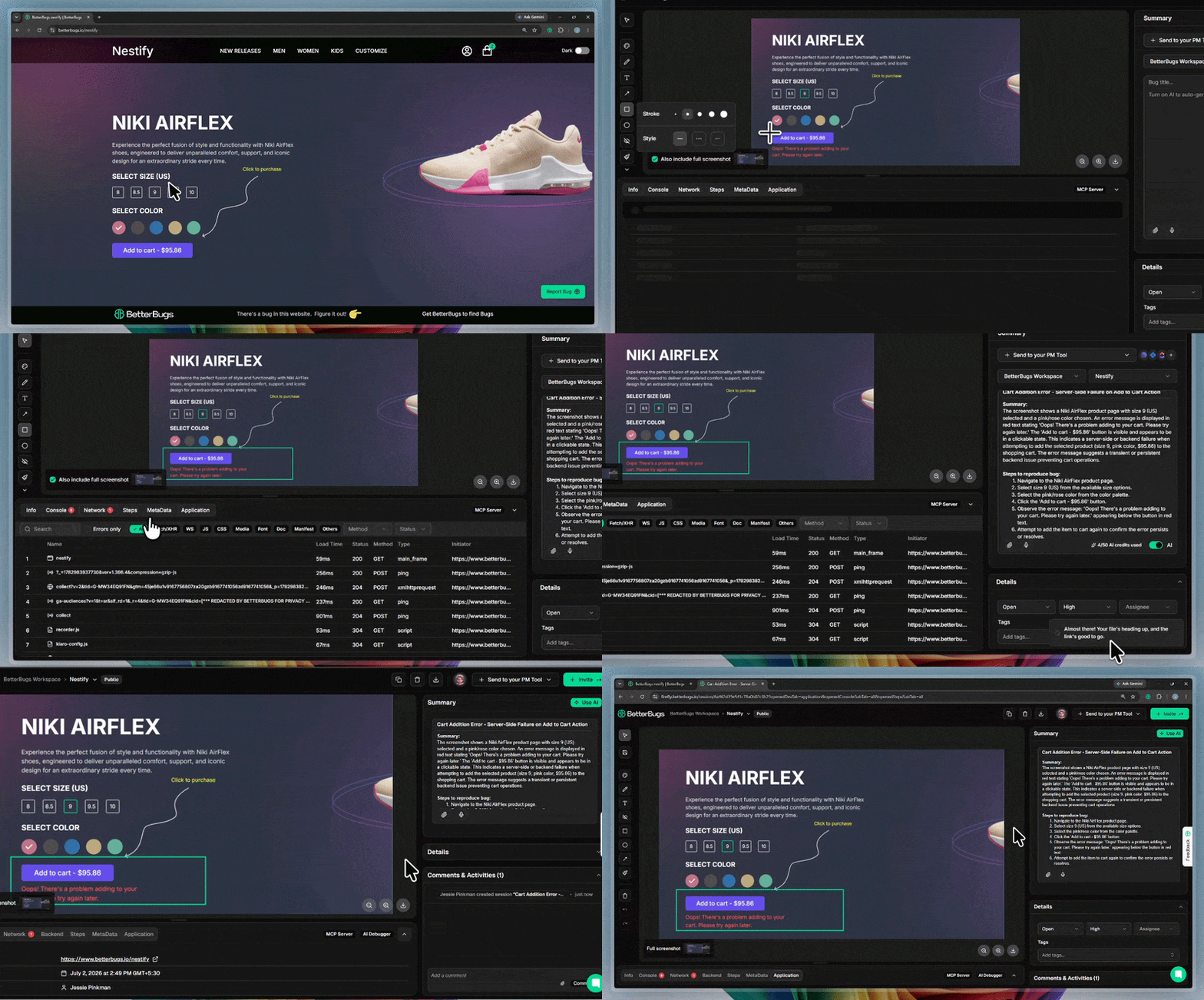
Creating a debugging ready bug report using BetterBugs.io in under 60 seconds
You can use BetterBugs.io as an everyday bug reporting tool; perfect for creating and sharing high-quality bug reports to others or to your project management and bug tracking tools (such as, Jira, Linear, GitHub, and many others) for your bug triage meetings.
BetterBugs has a zero learning curve with a lightweight and easy-to-use UI; perfect for technical and non-technical users.
You can download BetterBugs as a FREE Chrome Extension.
Here’s what BetterBugs.io brings to the table:
1 - Create actionable bug reports with complete info in one-click
With every screenshot or screen recording of the bug that you take using BetterBugs.io, it automatically attaches:
You do not have to attach these details manually while reporting issues to others or to your issue or bug trackers. Plus, you can use AI to instantly add bug summary + steps to reproduce for your bug reports.
BetterBugs automates the complete process of evidence gathering with quick sharing options — right from your browser and in a few clicks.
BetterBugs bug reports come bundled with complete context, visual proof, and technical info. This means when a bug reaches your triage team, it comes pre-loaded with all the info. And your team doesn't need to ask "What were you doing when this happened?" or "What browser were you using?". It's all there.
2 - No more incomplete and rejected reports
Many bugs get sent back to reporters because critical details are missing. With BetterBugs.io, you can share complete reports within minutes. So, your team spends less time requesting clarifications and more time actually triaging.
3 - Faster severity and priority assessment
With visual proof (screenshots, videos) and technical details (console errors, network requests) captured automatically, the triage team can make informed decisions on the severity and priority of the issues much faster.
4 - Quick sharing with others or your PM tools and issue trackers
Once a bug is triaged and assigned, you can share the report (with all attachments and technical details) via a unique link to others. Developers get everything they need without manual copy-pasting or jumping between tools.
BetterBugs.io seamlessly integrates with issue trackers and PM tools like Jira, Asana, Linear, and GitLab. You can instantly share a triaged bug (manually or using BetterBugs automation) to your project management tool with a few clicks.
5 - Chat-style AI-Debugger for RCA and the Next Steps
After a bug is triaged and assigned, devs can use BetterBugs' built-in chat-style AI Debugger to accelerate the fixing steps. This enables them to get:
6 - MCP Server for more accurate AI sessions
Developers can also use the BetterBugs MCP server to run AI debugging sessions using the bug report link + a quick prompt. It enables you to share the complete context and technical details of the bug to your AI agents; perfect for more accurate and less hallucinated code fixes. Works with VS Code, Claude, Cursor, and other text editors and IDEs that you use.
Also Read: How to Choose the Right Bug Reporting Tool: Top 7 Features to Look for
Next, your team confirms that what's been reported is actually a bug and not user error of how the feature is supposed to work.
Sometimes what looks like a bug is actually intended behavior that the user didn't understand. Or it may be a configuration issue. Validation can help ensure you're only triaging actual defects.
Here, bugs are sorted by type:
In this step, your team can categorize bugs and determine which team member should handle the fix. It also helps with end-to-end feature tracking. For instance, if you notice you're categorizing 30 bugs in the same module of the source code, you may have a deeper architectural issue.
Next, the triage team assigns severity and priority levels based on:
In this step, your team (QA, developers, product managers, and sometimes stakeholders) discuss each bug and collectively decide its priority.
Once prioritized, assign the bug(s) to a developer (or a team member) with the expertise to fix it. Plus, it’s important to address the clear ownership and timeline. To break it down:
Here’s a checklist you can borrow:
Nishil is a successful serial entrepreneur. He has more than a decade of experience in the software industry. He advocates for a culture of excellence in every software product.
Meet the Author: Nishil Patel, CEO, and Co-founder of BetterBugs. With a passion for innovation and a mission to improve software quality.
We never spam.